
Growth Tools
More sales from the WhatsApp you already run.
- 14-day free trial
- No credit card
- Setup help on WhatsApp
- Plans from ₹999/month + GST
Inside the app
See the growth tools around the app
Click through the real app, screen by screen. Every screenshot is Splashify Pro with sample data.
Delivered and read for every send, failure reasons and a re-send to people who did not read it.
Click a number to see what it does, or use the arrow keys.
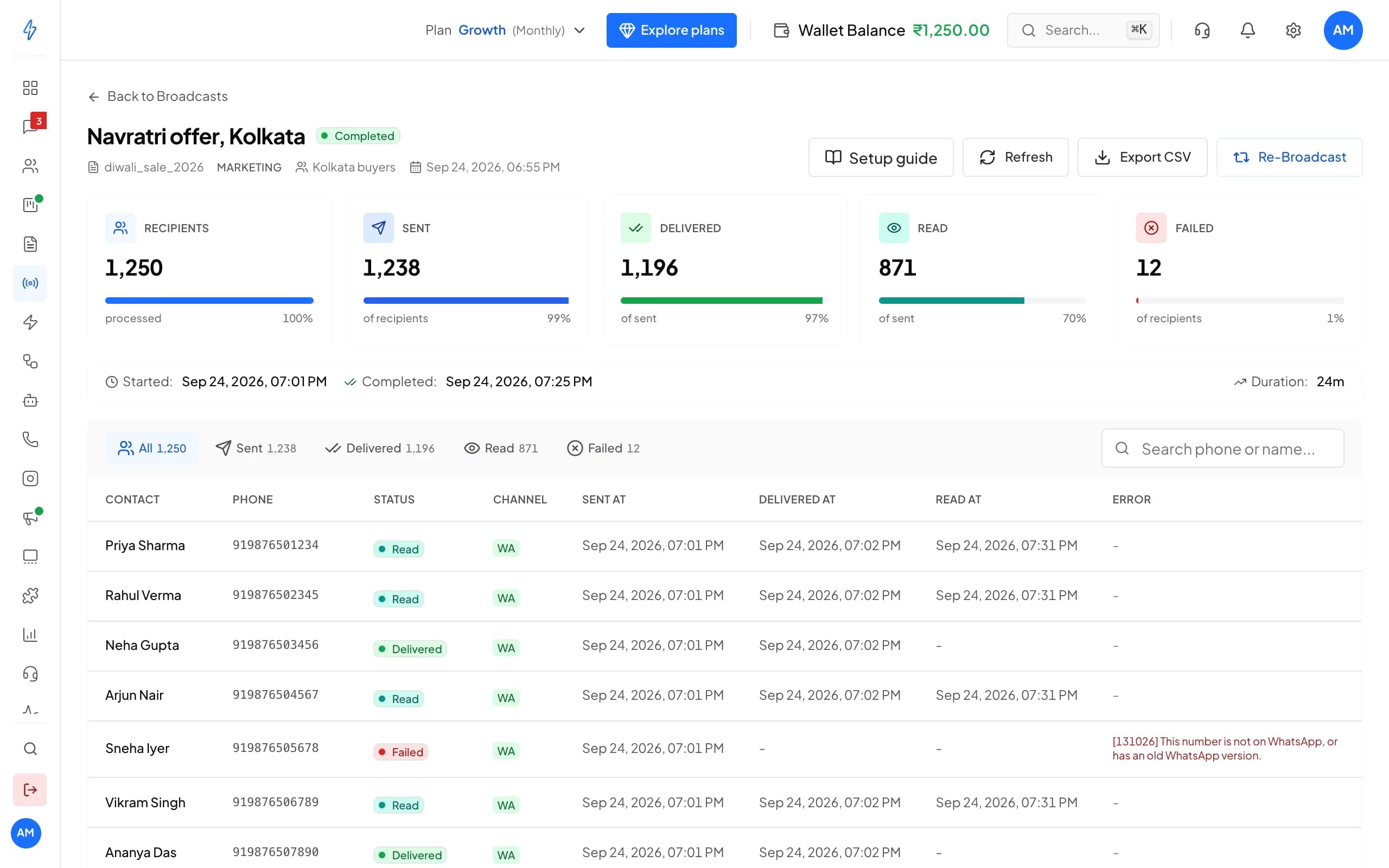
1 of 6
A report for every send
Template, audience and time on top, then the results.
Try it with your own number
14 days with every feature and no credit card. Our team helps you set up on WhatsApp.
Why growth tools
Each tool answers a question you already ask
Know what brings customers in
A QR code per branch, counter or flyer. Scans and started chats are counted per code, so you print more of what works.Never lose an unread broadcast
A third of a broadcast often goes unread. Retargeting sends those people a fresh message a day later, without touching anyone who already read.Spend where it returns
Template insights rank what gets read and answered. The spend limit stops a bad day from emptying the wallet.
Key features
From the first scan to the repeat order
QR codes with counts
Turn walk-ins and flyers into counted chats
- A designed, printable card per code, as PDF or PNG
- A chat is counted when the message arrives within 7 days of a scan
- The chat is tagged with the code's name, so you see it in the inbox too
QR codes
Last 7 daysShop counter
Diwali flyer
Delivery bag
Retargeting
Win back the people who did not read
- One automatic retarget per broadcast, cancellable until it fires
- Pick any approved template for the second try
- Also by hand: all failed, only unread, or everyone
Diwali offer
CompletedAutomatic retarget in 24 h
Scheduled1,240 people have not read it yet. They get the restock_alert template tomorrow. Anyone who reads before then is left out.
Template insights
Send more of what sells, less of what is ignored
- Rates come from your broadcasts, counted per person
- Weak flags compare against your account's own average
- One tap from a weak template to an AI rewrite
Template insights
Last 30 daysorder_update
diwali_offer
restock_alert
WeakSpend limit and alerts
A budget the wallet cannot cross
- Counts every charge from the wallet that day, less refunds
- A broadcast already sending is never cut off
- Low wallet alert at your own level, at most once a day
Daily spend limit
80% usedYou get an alert at 80% and at 100%. At the limit, new broadcasts wait until tomorrow.
Missed-chat digest
No lead slips away overnight
- Hot means a high lead score or your own hot tag
- A No reply filter in the inbox, any time
- On by default, one switch to turn it off
Chats with no reply
Today, 9:00 am
12 chats got no reply yesterday. 3 of them are hot leads.
Why Splashify Pro
Why growing businesses run these tools here
Inside the app
Same contacts, templates, inbox and wallet. Nothing to connect or copy.Counted honestly
Scans skip link previews and bots, and a person counts once per broadcast in the reply rate.Grows with referrals
Refer another business from Settings: after their first payment you both get ₹250 in your wallets.In your plan
The growth tools come with the app. No separate analytics or link tool to pay for.
Start growing in four steps
Sign up, connect WhatsApp, print your first QR code and let the numbers guide the rest.
Step 1: Sign up
Create your account and start the 14-day free trial. No credit card needed.
Step 2: Connect
Link your WhatsApp Business number through Meta's guided signup.
Step 3: Print a code
Make a QR code for your counter or next flyer and download its card.
Step 4: Send and learn
Broadcast, retarget the unread a day later, and check Insights before the next send.
Frequently asked questions
Still have a question?
Every scan of the code's link is counted for that code, per day, skipping link previews and known bots. A chat is counted when the person's first message arrives within 7 days of a scan, once per person per code in that window. The chat and the contact are tagged with the code's name.
The people the first broadcast reached who had still not read it at the moment the retarget is sent, with failed numbers left out. The list is worked out at send time, not when you schedule it, so someone who reads an hour before is excluded. One automatic retarget per broadcast, and you can cancel it until it fires.
On top of your plan, each message you send is charged at Meta's rate for its category (marketing, utility or authentication) and the customer's country, plus your plan's platform fee. Replies within 24 hours of the customer's last message are free for the first 1,000 each month, and incoming messages are always free. Meta charges apply during the free trial too. The pricing page lists every rate.
Most teams are live within 1-2 hours through Meta's guided signup. You'll need a Meta Business Account, a phone number not currently registered with WhatsApp, and basic business verification documents. Our team helps you on WhatsApp if you get stuck.
Yes. Export your contacts, connect your WhatsApp Business number through Meta's guided signup, then import your contacts and add your templates again. Our team helps you on WhatsApp while you switch.
Yes. Pick any of your approved templates, and its own category and language decide the price of the send. A fresh angle often works better on people who ignored the first message.
A message back from that person within 72 hours of your broadcast message, counted once per person per broadcast. Reactions do not count.
New broadcasts are refused with a clear message until the day resets at midnight India time. A broadcast that is already sending is never cut off, so a day can end slightly over the limit. You get an alert at 80% and at 100%.
Every account has an invite link on the Refer a business page in Settings. When the business you invite signs up and makes its first payment, any plan or wallet recharge, ₹250 lands in their wallet and ₹250 in yours, once per referred business.
The verified badge is granted by Meta, not by any provider, once your business meets Meta's criteria. Verify your business on Meta first; our team can walk you through the request.
No. Most workflows are no-code: the visual flow builder, chatbots, the template designer and the broadcast scheduler all work without code. Developers can use the REST API for custom integrations.
Message only people who have agreed to hear from you on WhatsApp; Meta requires it. Opted-out and blocked numbers stay in their own list and never get your broadcasts. Customer data is encrypted at rest and in transit, every action in your account is logged, and data requests under India's DPDP Act go through our data request page.
Still have a question?
Print a QR code today, retarget tomorrow's unread, and watch the counts climb. Start free for 14 days.
- 14-day free trial
- No credit card
- Setup help on WhatsApp