
Sales pipeline CRM
A sales pipeline CRM where no deal goes cold.
- 14-day free trial
- No credit card
- Setup help on WhatsApp
- Plans from ₹999/month + GST
Inside the app
See the sales pipeline in the app
Click through the real app, screen by screen. Every screenshot is Splashify Pro with sample data.
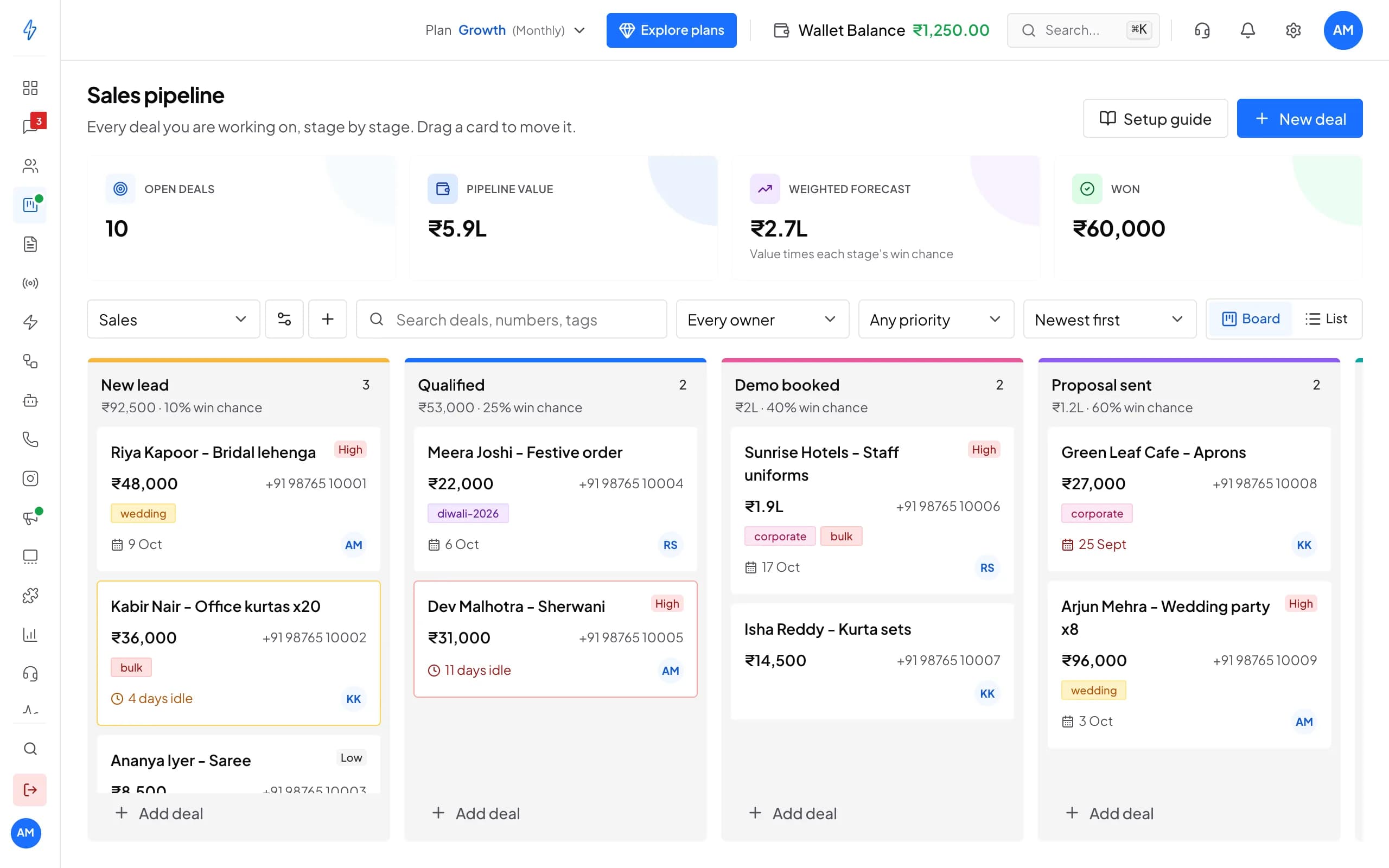
Follow every deal from the first chat to won, stage by stage, with idle deals flagged.
Click a number to see what it does, or use the arrow keys.
1 of 6
Value and forecast
Open deals, pipeline value, weighted forecast and won deals, always up to date.
Try it with your own number
14 days with every feature and no credit card. Our team helps you set up on WhatsApp.
Why a sales pipeline
Know where every sale stands
No enquiry forgotten
A bulk saree order, a coaching batch enquiry or a flat viewing: each gets a card with its value, owner and close date.Follow-ups on time
Cards turn amber, then red, when nothing has happened for a while, and a missed close date shows in red.A number you can plan with
Pipeline value and a weighted forecast show what is likely to close, next to what you have already won.
Key features
From the first chat to won, in one place
Deals from chats
Turn a WhatsApp chat into a deal
- Add to pipeline from any chat in Messages
- Or from the three dots on a contact's row
- A contact can have more than one deal
Kabir Nair
Deals
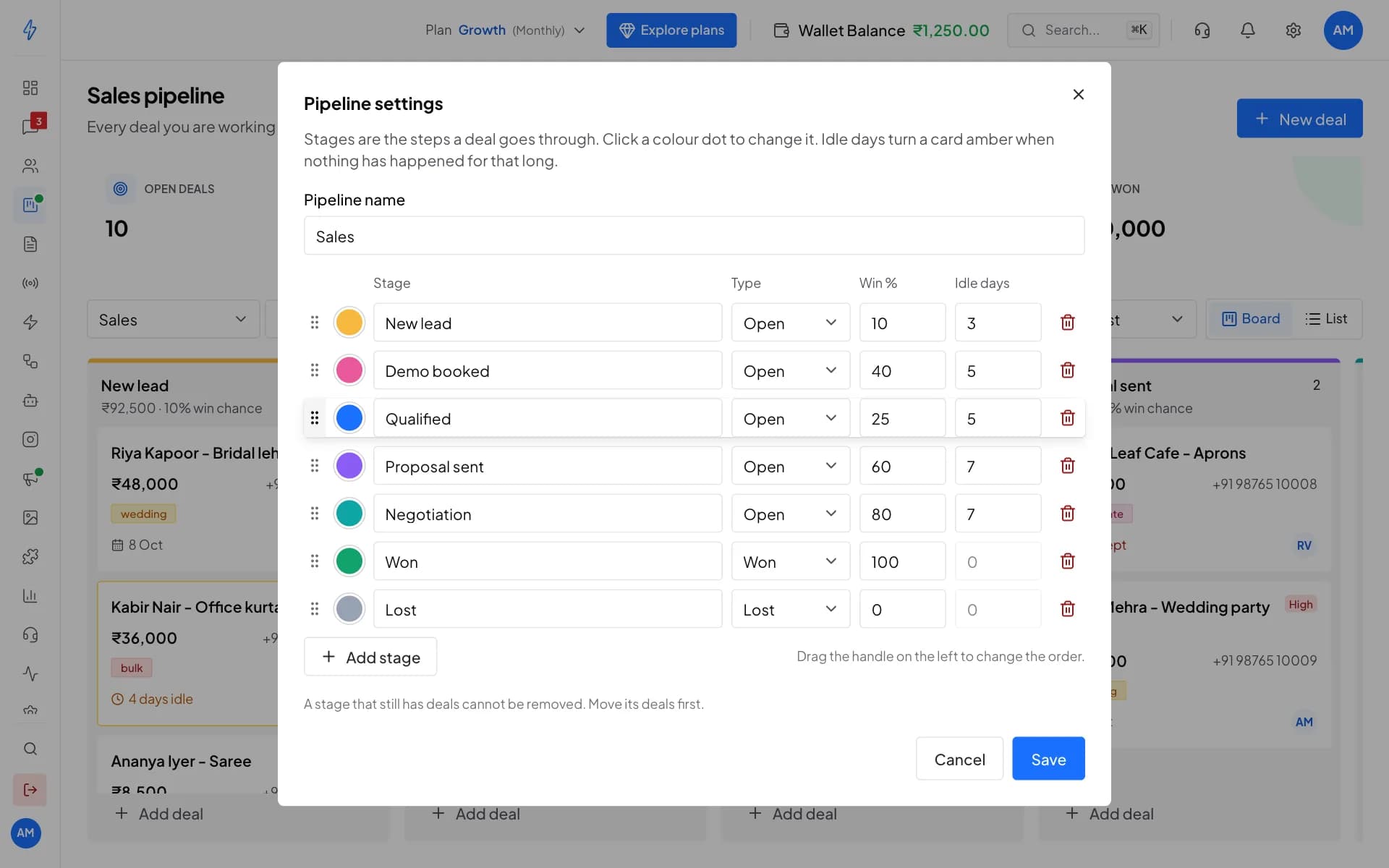
One deal, everything in it
Call, note and close from the deal
- Call or copy the number from the deal
- Notes, plus every move and change with the time
- Close it as won, or lost with a reason
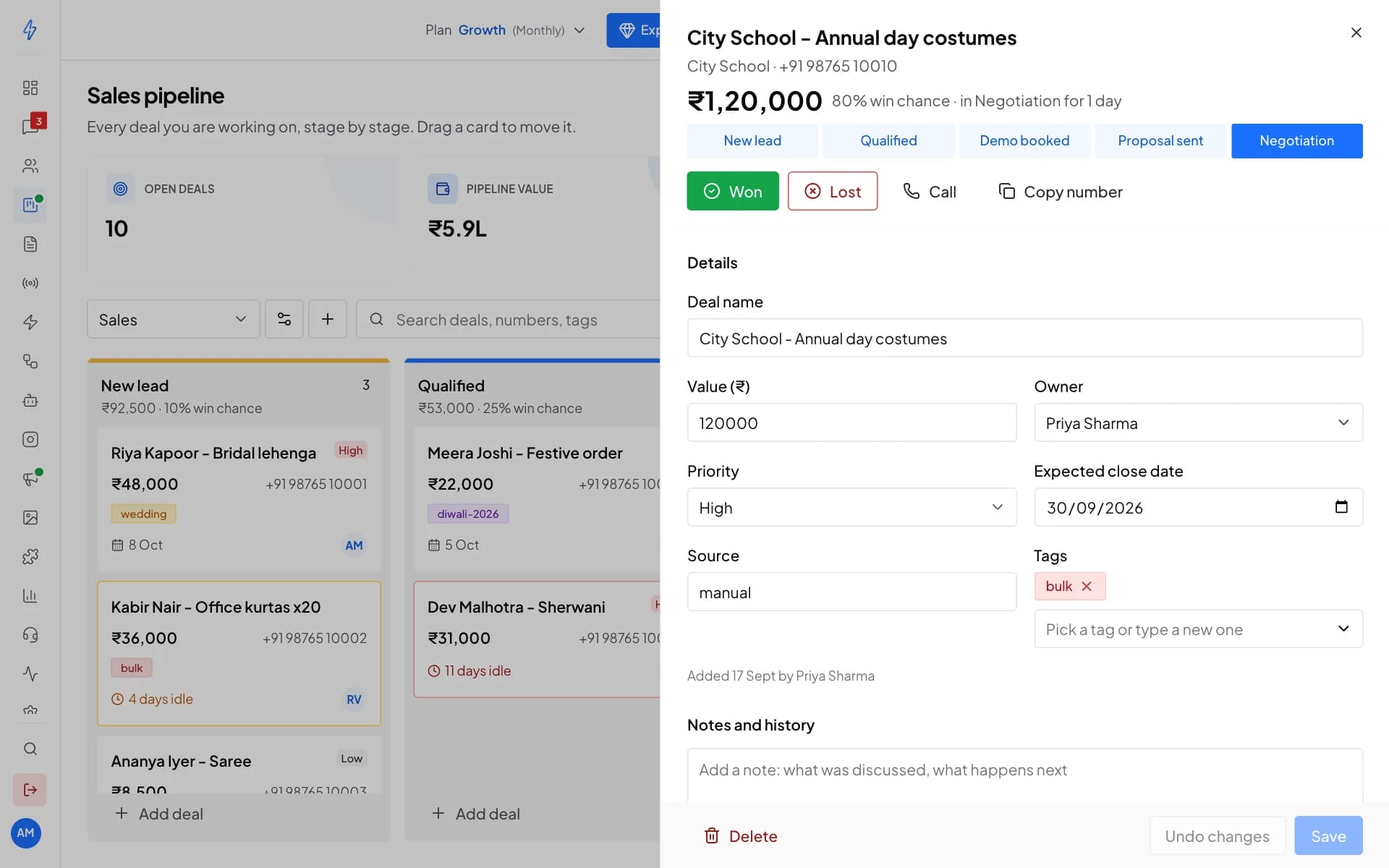
Lost reasons
Learn why sales are lost
- Price too high, chose a competitor, no reply and more
- Or your own words, up to 200 characters
- Reopen a won or lost deal at any time
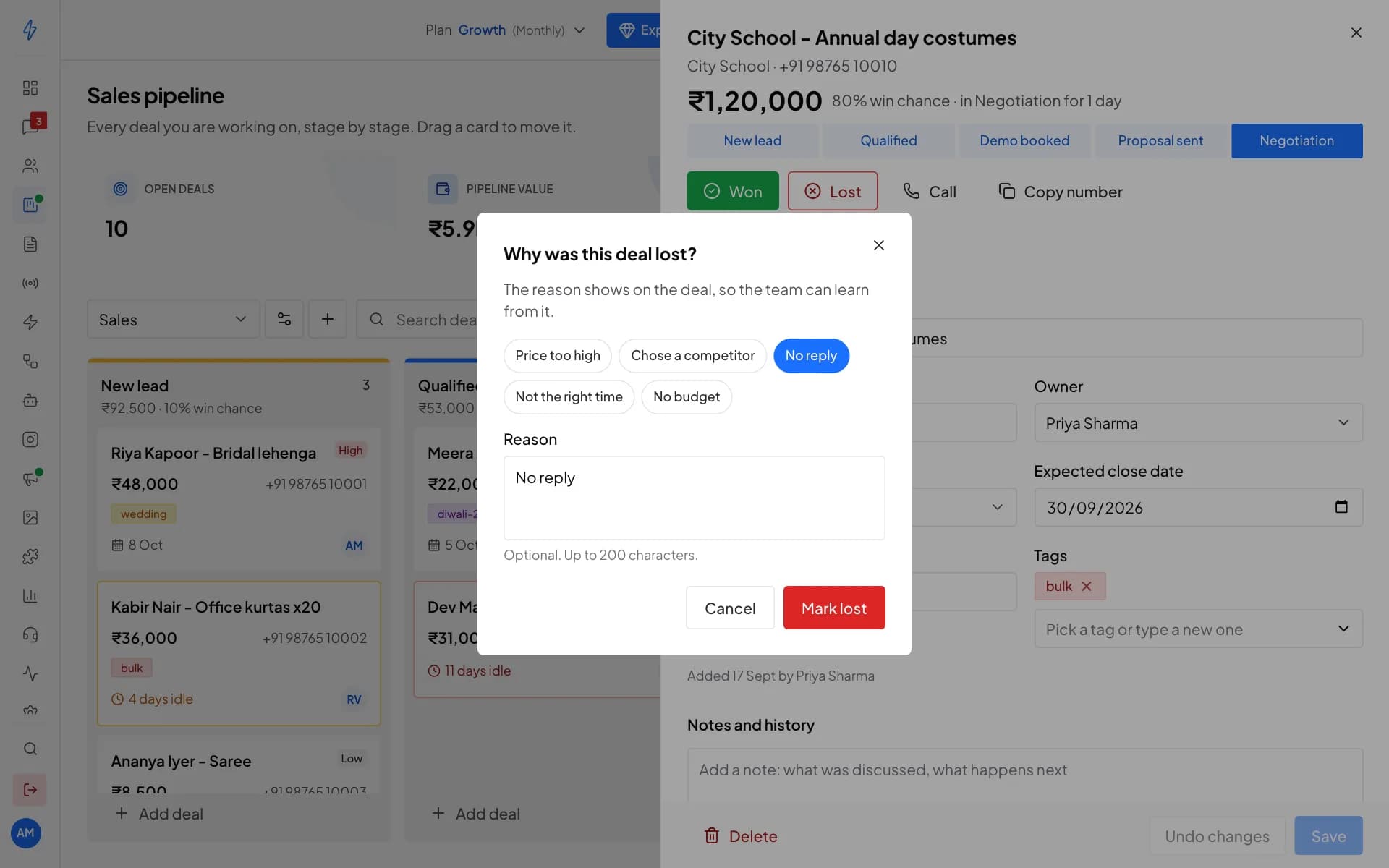
Stages and pipelines
Stages that match how you sell
- 2 pipelines on Growth and 10 on Advanced
- Win chance feeds the weighted forecast
- Idle days decide when a card turns amber
Why Splashify Pro
Why teams track their sales on Splashify Pro
Next to your chats
Deals sit with the contact and the WhatsApp chat, so nothing is copied between apps.Ready on day one
A Sales pipeline with seven common stages is waiting the first time you open it.Access you control
Give each teammate no access, view only or full access to the pipeline.Part of your plan
2 pipelines on Growth and 10 on Advanced. No separate CRM to pay for.
Start your pipeline in four steps
Sign up, connect WhatsApp, add your deals and follow up. No code needed.
Step 1: Sign up
Create your account and start the 14-day free trial. No credit card needed.
Step 2: Connect
Link your WhatsApp Business number through Meta's guided signup, so your chats and contacts come in.
Step 3: Add deals
Open Sales Pipeline: a Sales pipeline with seven stages is ready. Add deals from chats or contacts.
Step 4: Follow up
Give your team access, move cards as sales move and call back the amber ones first.
Frequently asked questions
Still have a question?
It depends on your plan: 2 pipelines on Growth and 10 on Advanced. Each pipeline has its own stages, for example one for sales and one for onboarding new customers. The pricing page lists what each plan includes.
Yes. In Messages, open the chat and click Add to pipeline under Deals on the right. On the Contacts page, click the three dots on a contact's row, then Add to pipeline. The contact is filled in for you.
On top of your plan, each message you send is charged at Meta's rate for its category (marketing, utility or authentication) and the customer's country, plus your plan's platform fee. Replies within 24 hours of the customer's last message are free for the first 1,000 each month, and incoming messages are always free. Meta charges apply during the free trial too. The pricing page lists every rate.
Most teams are live within 1-2 hours through Meta's guided signup. You'll need a Meta Business Account, a phone number not currently registered with WhatsApp, and basic business verification documents. Our team helps you on WhatsApp if you get stuck.
Yes. Export your contacts, connect your WhatsApp Business number through Meta's guided signup, then import your contacts and add your templates again. Our team helps you on WhatsApp while you switch.
A deal is one sale you are working on with a contact. It has a value in rupees, an owner from your team, a priority, an expected close date and up to 10 tags. A contact can have more than one deal.
Each stage has idle days. When nothing has happened on a deal for that many days, its card turns amber, and red at twice that. A close date in the past also shows in red. Open the deal and add a note, or move it on.
Each open deal's value is multiplied by its stage's win chance, and the results are added up. You set the win chance of each stage in Pipeline settings.
Yes, with access. The account owner sets each team member to No access, View only or Full access for Sales Pipeline in Settings, under Agents. View only members can see deals but not add, move or change them.
The verified badge is granted by Meta, not by any provider, once your business meets Meta's criteria. Verify your business on Meta first; our team can walk you through the request.
No. Most workflows are no-code: the visual flow builder, chatbots, the template designer and the broadcast scheduler all work without code. Developers can use the REST API for custom integrations.
Message only people who have agreed to hear from you on WhatsApp; Meta requires it. Opted-out and blocked numbers stay in their own list and never get your broadcasts. Customer data is encrypted at rest and in transit, every action in your account is logged, and data requests under India's DPDP Act go through our data request page.
Still have a question?
Put every sale on one board this week. Start free for 14 days.
- 14-day free trial
- No credit card
- Setup help on WhatsApp