
Chatbots and AI agents
Build AI WhatsApp chatbots that actually answer customers.
- 7-day free trial
- No credit card
- Setup help on WhatsApp
- Plans from ₹999/month + GST
Inside the app
See the chatbot builder in the app
Click through the real app, screen by screen. Every screenshot is Splashify Pro with sample data.
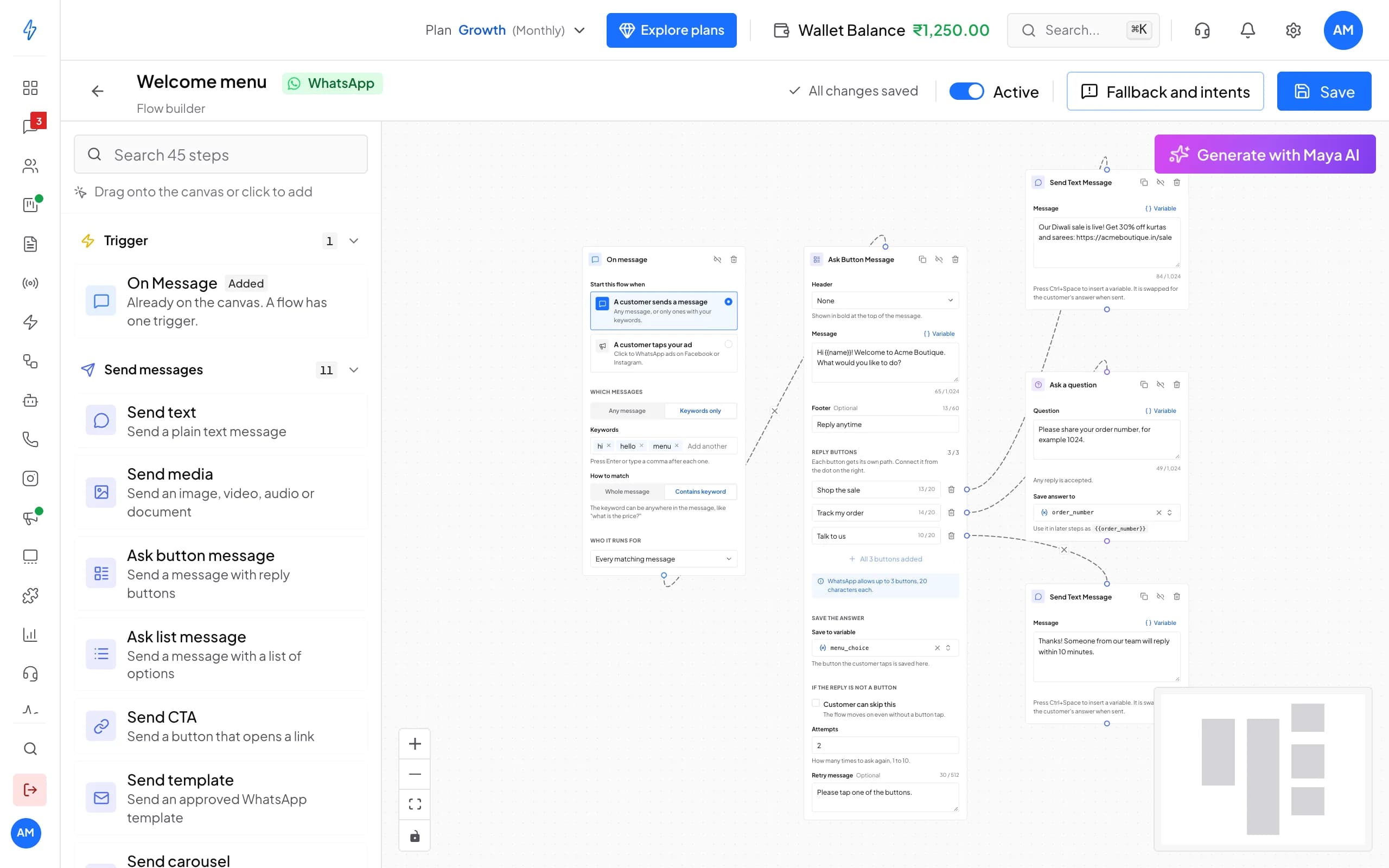
Drag steps onto a canvas to build menus, questions and handovers, with no code.
Click a number to see what it does, or use the arrow keys.
1 of 6
45 ready-made steps
Drag steps onto the canvas: messages, questions, buttons, lists, templates and more.
Try it with your own number
7 days with every feature and no credit card. Our team helps you set up on WhatsApp.
Why a chatbot
Answers in seconds, sales that don't wait
Replies day and night
A customer asking at 11 pm on a Sunday gets an answer, so fewer leads go cold while your team is offline.Fewer repeat questions
Timings, prices, order status and returns are answered from your own files.Leads your team can close
The bot asks the qualifying questions and hands warm chats to a person.
Key features
A flow builder and AI agents in one tool
Visual flow builder
Drag, connect and switch it on
- 45 ready-made steps
- Up to three reply buttons, each with its own path
- Describe the flow and let AI draft it
AI agents
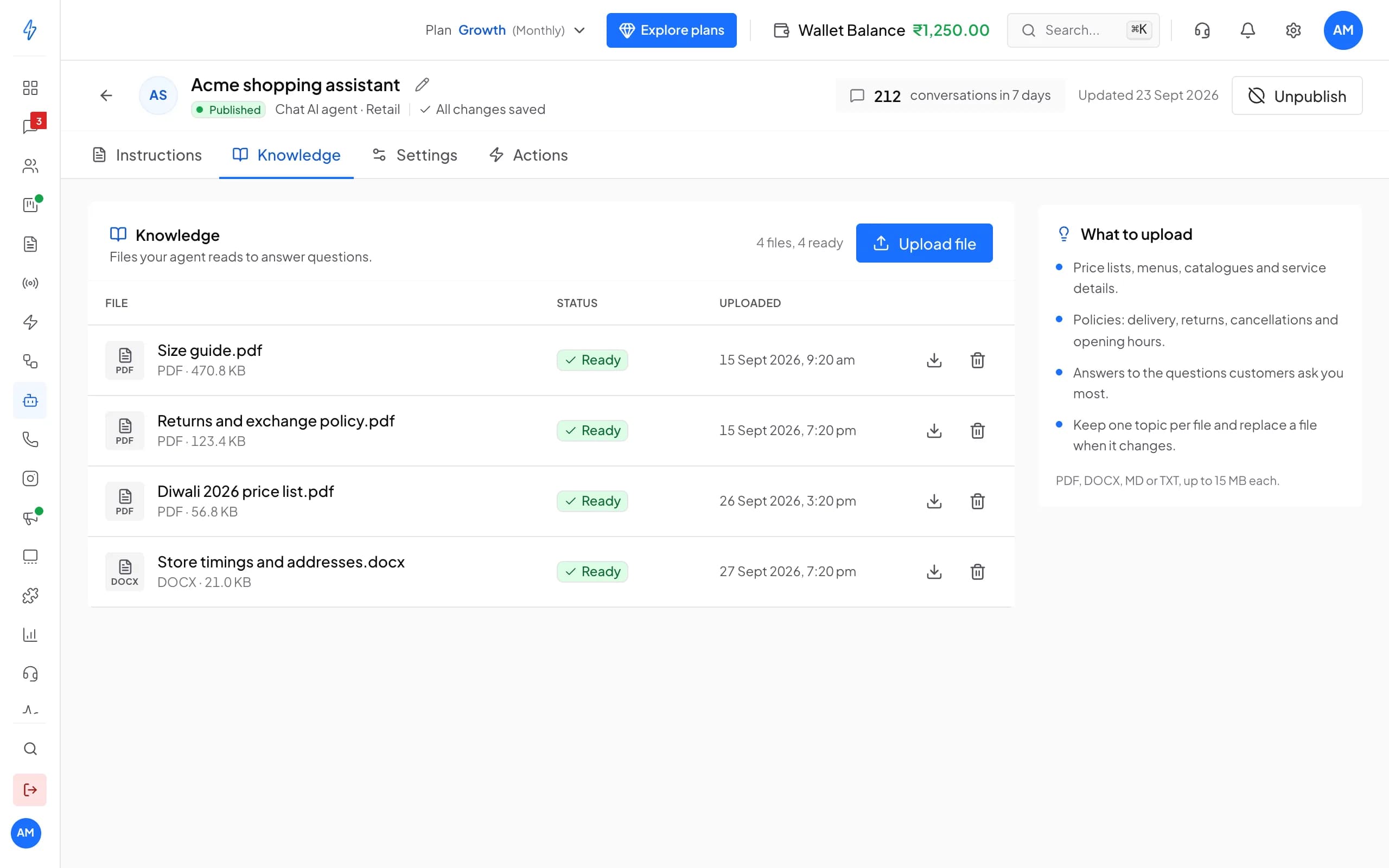
An AI agent trained on your business
- PDF, DOCX, MD or TXT files
- Understands photos customers send
- Try it in a sample chat before going live
Human handoff
Your team steps in at the right moment
- Assigned to the right teammate
- AI chat summary and next step
- One inbox for WhatsApp and Instagram
- Today
- Customer: Hi, where is my order #1042?
- Acme Boutique (AI agent): Hi Aarav! Order #1042 left our Pune store today and reaches you by Thursday. Buttons: Track order.
- Customer: Can I change the size to L?
- Acme Boutique (AI agent): Sure. I've asked Riya from our team to update it. She'll confirm here shortly.
- Chat assigned to Riya
Verified Business
Try it here
Chat with a sample AI agent
Pick a business, tap a question and watch how an AI agent answers and hands over. Nothing is sent and nothing to install.
Build a WhatsApp message
Type your offer, pick a picture and add buttons. The phone shows it the way your customer will see it.
Loading
Why Splashify Pro
Why teams build their chatbot on Splashify Pro
Speaks Indian languages
Hindi, English and other Indian languages, in the customer's own words.No code for anyone
Your support or sales lead builds the bot, not a developer.Grounded in your files
Answers come from what you upload, and you set how freely it words them.Handoff built in
No separate inbox tool: the bot and your team share one inbox.
Go live in four steps
Sign up, connect your number, teach your AI agent and go live. No code needed.
Step 1: Sign up
Create your account and start the 7-day free trial. No credit card needed.
Step 2: Connect
Link your WhatsApp Business number through Meta's guided signup. Add Instagram too.
Step 3: Teach
Add your products, prices and policies. The AI agent learns them in plain language.
Step 4: Go live
Switch the agent on, send your first broadcast and watch replies land in one inbox.
Frequently asked questions
Still have a question?
Yes. AI agents understand and reply in Hindi, English and other Indian languages such as Tamil, Telugu, Marathi, Bengali, Kannada and Gujarati, so your chatbot answers in the customer's language.
It depends on what you give it. With a clear price list, policies and FAQs, the agent answers routine questions on its own and hands anything unclear to your team. The creativity setting keeps answers close to your files.
On top of your plan, each message you send has a price that depends on its category (marketing, utility or authentication) and the customer's country. Replies within 24 hours of the customer's last message are free for the first 1,000 each month, and incoming messages are always free. Message charges apply during the free trial too. The pricing page lists every price.
Most teams are live within 1-2 hours through Meta's guided signup. You'll need a Meta Business Account, a phone number not currently registered with WhatsApp, and basic business verification documents. Our team helps you on WhatsApp if you get stuck.
Yes. Export your contacts, connect your WhatsApp Business number through Meta's guided signup, then import your contacts and add your templates again. Our team helps you on WhatsApp while you switch.
Yes. Try the agent in a sample chat with your settings, and switch a flow on only when it is ready. Every change is saved as you go.
The verified badge is granted by Meta, not by any provider, once your business meets Meta's criteria. Verify your business on Meta first; our team can walk you through the request.
No. Most workflows are no-code: the visual flow builder, chatbots, the template designer and the broadcast scheduler all work without code. Developers can use the REST API for custom integrations.
Message only people who have agreed to hear from you on WhatsApp; Meta requires it. Opted-out and blocked numbers stay in their own list and never get your broadcasts. Customer data is encrypted at rest and in transit, every action in your account is logged, and data requests under India's DPDP Act go through our data request page.
Still have a question?
Let a chatbot answer tonight's questions. Start free for 7 days.
- 7-day free trial
- No credit card
- Setup help on WhatsApp