
AI voice agent
The AI receptionist that never sleeps.
- 14-day free trial
- No credit card
- Setup help on WhatsApp
- ₹50 free call credit
- Plans from ₹2,999/month + GST
Inside the app
See your voice agent at work
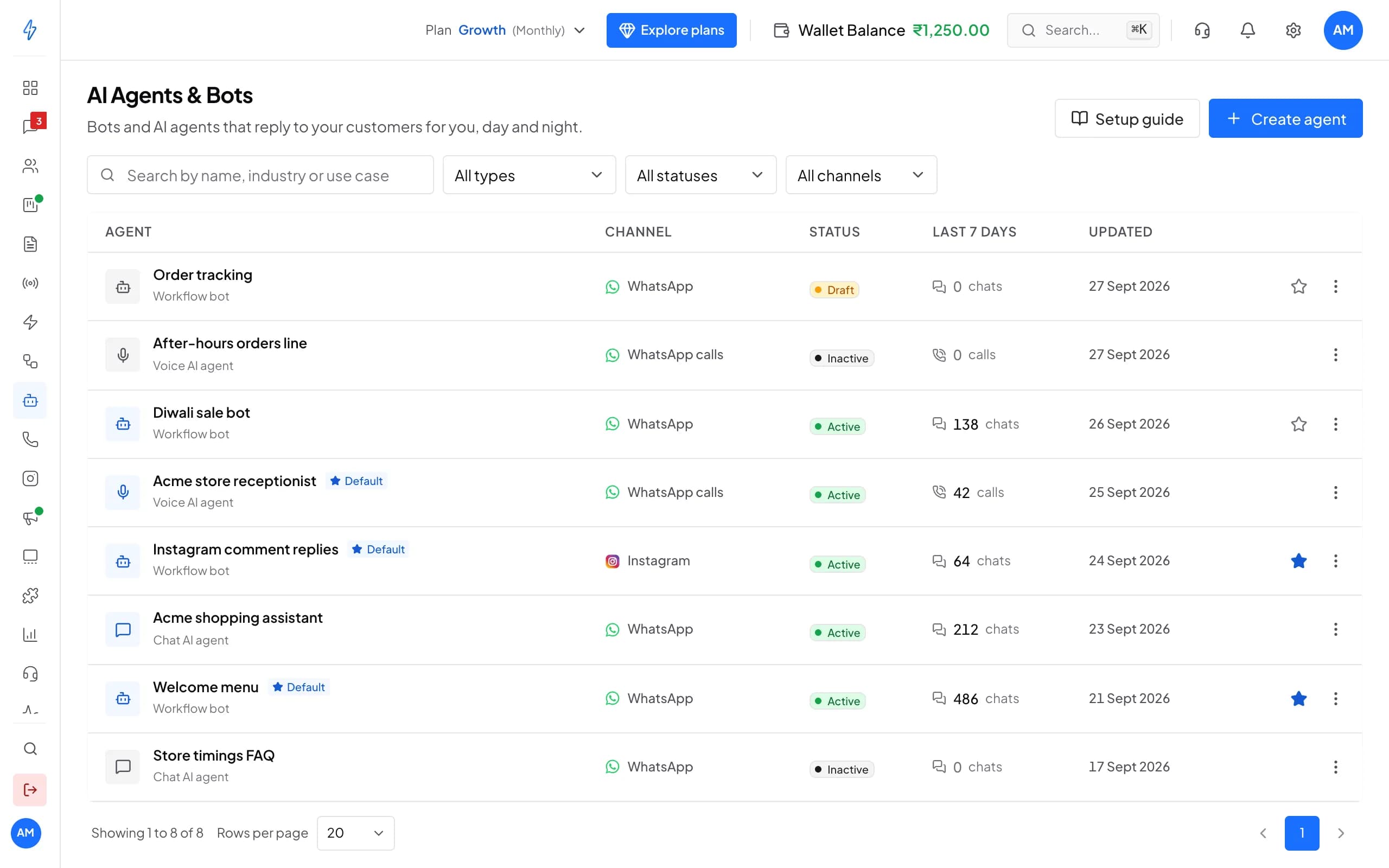
Your agents, every call they took and what they did on it. Screens from a demo account with sample data.
Voice agents sit next to your chat bots, each on its channel, with the calls it took this week.
Click a number to see what it does, or use the arrow keys.
1 of 6
Create an agent
Start from your industry and use case, then fine-tune it.
Hear it before your customers do
Set up an agent in the free trial and call it from your browser. Test calls cost nothing.
What you get
Every call answered, every lead saved
No missed calls
The agent answers your WhatsApp Business calls day and night, even when your team has gone home.Leads saved for you
The caller's name, number and what they want go straight into Contacts, tagged for follow-up.Your team gets the right calls
Upset callers and tricky questions go to a person. The agent handles the rest.
How it works
An AI that actually does work, not just chats.
Set it up
Tell it who to be, in plain words
- Standard voice for quick replies, Studio for the richest sound
- Starts with English and Hindi
- Preview every voice before you pick
Voice AI agent · Persona
Acme store receptionist
Greeting
Voice quality
Studio
Voice
Warm, female
Instructions
- Keep replies to one or two sentences.
- Reply in Hindi when the caller speaks Hindi.
- Never promise a discount. Offer a callback instead.
Knowledge base
It answers from your own files
- TXT, MD or CSV files, or a photo of a document
- Up to 50 MB a file
- Update a file when prices change
Voice AI agent · Knowledge base
What your agent knows
- Ready
Diwali 2026 price list.csv
CSV · 48 sections
- Ready
Size guide.md
Markdown · 12 sections
- Ready
Store timings and addresses.txt
Text · 6 sections
- Ready
Returns and exchange.jpg
Photo of a document · 9 sections
Actions
It saves leads and plans callbacks
- Saves leads to Contacts and tags them
- Plans callbacks and sends a WhatsApp follow-up
- Looks up live data, like order status, from your own system
Sneha Iyer
+91 98765 05678 · WhatsApp call · 1m 36s
Routing
A person takes over when it counts
- Hands over when the caller asks for a person
- Working hours for each day
- One default agent for inbound calls
Voice AI agent · Routing
When the AI can't answer
Forward calls to
Riya Sen
+91 98765 43210
Default agent
Answers every inbound WhatsApp call
Working hours
Why Splashify Pro
Built for Indian businesses that live on the phone
Indian languages
Every voice speaks English and Indian languages, so callers talk the way they like.Tools that do the work
Lead capture, tags, callbacks, WhatsApp follow-ups and transfers, each one on or off.Human handoff
The agent hands a call to your team member when the caller asks or is upset.Every call on record
The Activity tab shows each call, how it ended and every action the agent took.Working hours
Let the agent work round the clock, or only the hours you choose.Free browser test calls
Talk to your agent from the browser with a live transcript before customers call it.
Live in four steps
Set it up yourself in the app. No code, no extra hardware.
Step 1: Create the agent
Pick Voice AI agent, write the greeting and choose a voice.
Step 2: Add what it should know
Upload your price list, timings and policies to the knowledge base.
Step 3: Test it for free
Call the agent from your browser and fine-tune its instructions.
Step 4: Go live
Make it the default agent. WhatsApp calls to your number now reach it.
Pricing
Pay only for the calls it takes
Test calls
Free
Call your agent from the browser as often as you like. Nothing leaves your wallet.
Real calls
Billed per second
From the moment the agent picks up, at your rate per minute. Your rate shows on your agent's page before any call. GST is added when you top up.
Trial credit
₹50
Added to your wallet the first time you create a voice agent, so you can try real calls.
Voice AI comes with the Advanced plan (from ₹2,999/month + GST) and Enterprise.
Frequently asked questions
Still have a question?
The agent talks in a natural voice and answers with your own greeting, in the words you write. If you prefer to tell callers up front, start the greeting with something like "Hi, this is the AI assistant for Acme Boutique".
Every voice speaks English and Indian languages. New agents start with English and Hindi. Tell the agent in its instructions to answer in the caller's language, for example "Reply in Hindi when the caller speaks Hindi", and try it with a free test call.
Pay as you go from your wallet. Real calls are charged per second at your rate per minute, which shows on your agent's page. Test calls from your browser are free. The first time you create a voice agent, we add ₹50 to your wallet to try real calls. GST is added when you top up, not on each call.
Voice AI comes with the Advanced plan (from ₹2,999/month + GST) and Enterprise. Calls are paid separately from your wallet. The 14-day free trial lets you set up an agent and test it before you pay.
The agent tells the caller and hands the call to the team member you picked under Forward calls to. Calls that come in while the wallet is empty also go to that person. The agent's page warns you when fewer than 10 minutes of calls are left.
Yes. Pick a team member under Forward calls to on the Routing tab. The agent hands the call over when the caller asks for a person or is upset. You can also set working hours: calls outside them go straight to that person.
It puts it where your team works. Leads go to Contacts with the tag voice-ai-lead, callbacks show on your dashboard at the time the caller picked, and follow-ups reach the caller on WhatsApp. The Activity tab shows every action the agent took on every call.
Yes. Click Test call on the agent's page and talk to it through your browser microphone. A live transcript shows both sides and each action the agent takes. Test calls are free and end on their own after 5 minutes.
Yes. Voice AI answers calls to your WhatsApp Business number on Splashify Pro, with calling turned on. Calling does not work on a number that also uses the WhatsApp Business app on a phone. If you already use us for messages or broadcasts, you are set. New customers connect their number in the same signup.
Message only people who have agreed to hear from you on WhatsApp; Meta requires it. Opted-out and blocked numbers stay in their own list and never get your broadcasts. Customer data is encrypted at rest and in transit, every action in your account is logged, and data requests under India's DPDP Act go through our data request page.
Still have a question?
Stop missing calls. Let the AI pick up.
- 14-day free trial
- No credit card
- Setup help on WhatsApp