
Bulk SMS
Reach customers on any phone with Bulk SMS
- 14-day free trial
- No credit card
- Setup help on WhatsApp
- Plans from ₹999/month + GST
Three ways to send
Send SMS the way your business works
On every plan
In Splashify Pro
SMS sits next to WhatsApp and RCS, with the same contacts, segments, tags and wallet.
- Broadcasts to your segments and tags
- One SMS from a contact's row
- An SMS step in drip campaigns
- An SMS when a WhatsApp message fails
For developers
By API
Send any approved template from your website, app or CRM, with the API key you already use for WhatsApp.
- One call per SMS, with safe retries
- Look up any SMS by its ID
- Delivery reports sent to your server
SMS only
On the SMS panel
Only need SMS? Our standalone SMS panel has its own login and wallet, and needs no WhatsApp.
- Broadcasts from a CSV file you upload
- Sender IDs, templates and delivery status
- API keys and delivery webhooks
Inside the app
See SMS in the app
Click through the real screens, one by one. Every screenshot is Splashify Pro with sample data.
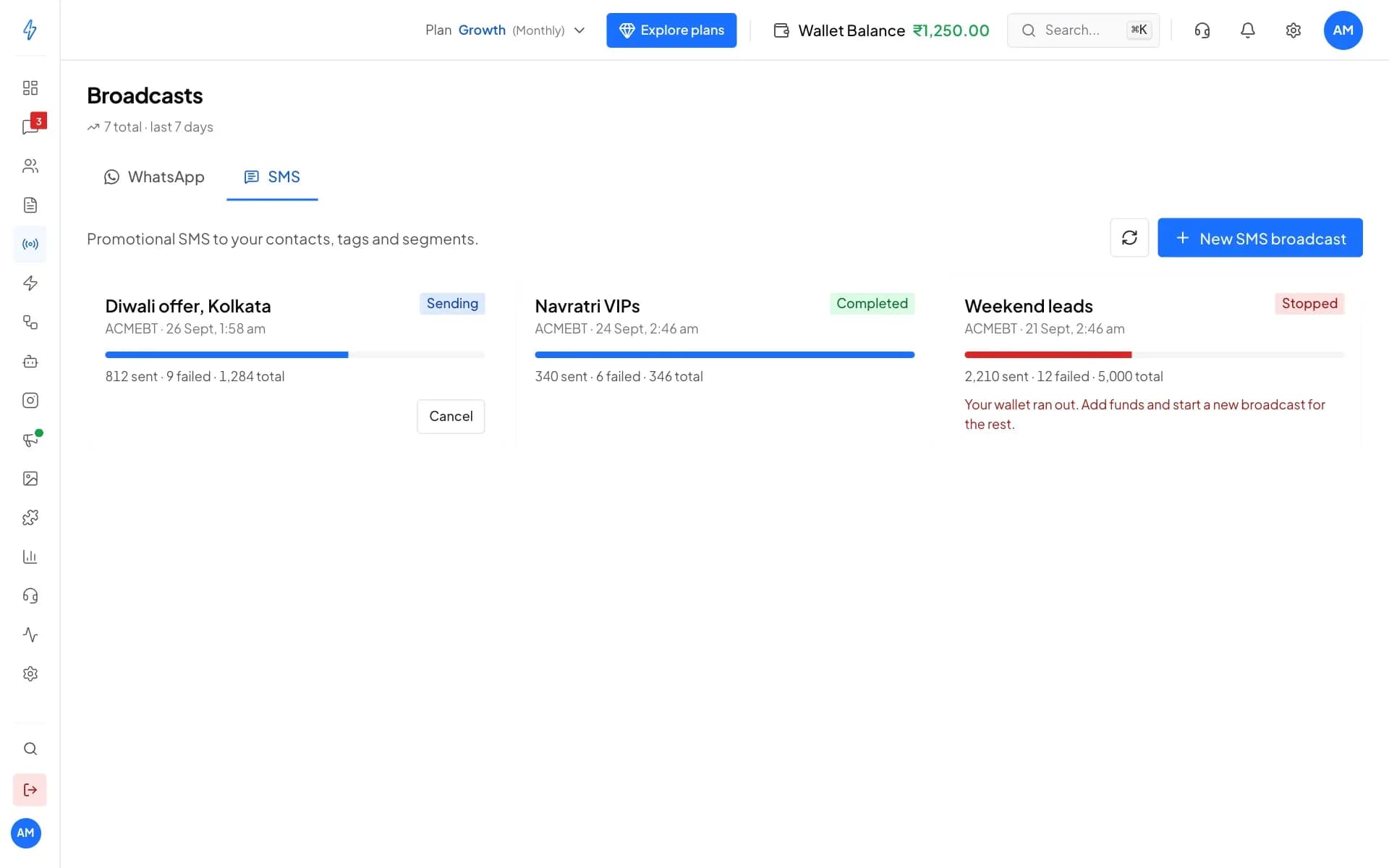
Promotional SMS to your segments and tags, with live progress and a stop when your wallet runs out.
Click a number to see what it does, or use the arrow keys.
1 of 6
WhatsApp and SMS
SMS broadcasts have their own tab, right next to WhatsApp.
Send your first SMS campaign with us
Start the 14-day free trial, or book a demo and we will walk you through the DLT setup.
Why SMS
The one message every phone can get
Reaches any phone
Feature phone, no data or no WhatsApp: an SMS still lands in the phone's own messages app.Catches who WhatsApp misses
Customers without WhatsApp, or whose WhatsApp message failed, still get your offer by SMS.No surprises on the bill
The app shows the cost before you send, paid per SMS part from the wallet you already use.
SMS in the app
Everything you need to send SMS
SMS broadcasts
Send an offer to thousands in a few clicks
- Everyone in your segments and tags, each person once
- Opted-out, blocked and non-Indian numbers left out for you
- Live progress, and cancel while it is sending
DLT templates
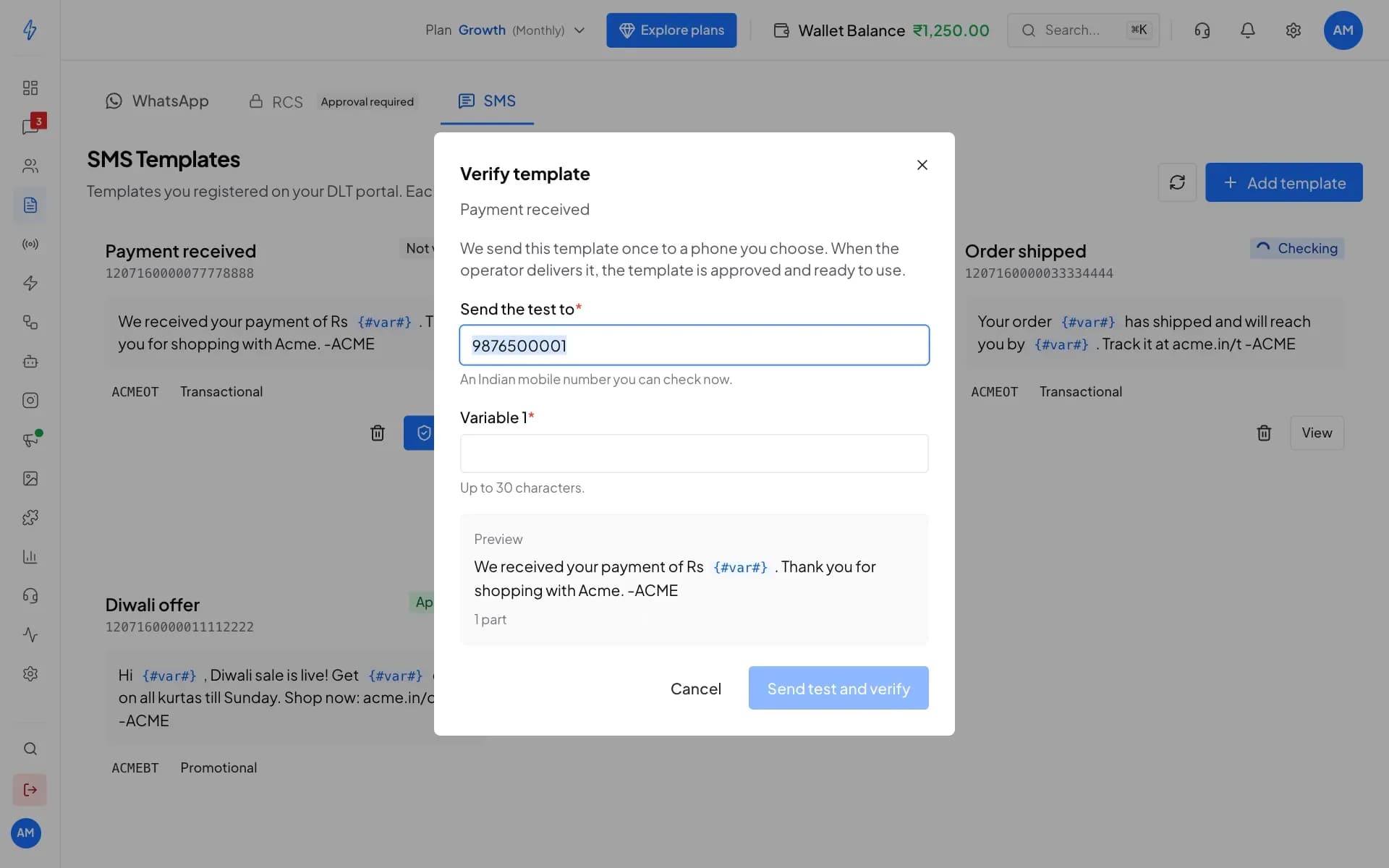
Know a template works before your campaign does
- Promotional, transactional and service templates
- Variables filled from names or your own contact fields
- SMS parts and the cost shown before every send
One-to-one and drip
The right SMS at the right moment
- Your agents can send a one-off SMS too
- Each contact gets each drip SMS once
- A drip SMS due at night waits until 9 am
Drip campaign
New arrivals follow-up
- New arrivals, with photosRight awayWhatsApp
- Store visit reminderAfter 2 daysSMSHi Riya, new arrivals are in at our Pune store. Visit Acme Boutique this week.
- Festive offerAfter 5 daysWhatsApp
SMS with WhatsApp
Reach people when WhatsApp fails
- SMS, RCS or both, in the order you choose
- A promotional SMS template for a marketing message
- Customers who got the WhatsApp message get nothing more
New broadcast
Diwali offers
If WhatsApp fails
Only customers whose WhatsApp message failed get the next step.
diwali_offer
Sends first
- SMS
Diwali offer
Then SMS · 1 part
Hi Priya, Diwali sale is live! Get 30% off on all kurtas till Sunday. Shop now: acme.in/diwali -ACME - RCS
diwali_card
Then RCS · Rich card
SMS API
Send SMS from your website, app or CRM
- Order updates, reminders and login codes
- Safe retries that never send the same SMS twice
- Signed accepted, delivered and failed reports
Request
{ "to": "+919876543210", "dlt_template_id": "1107160000000000001", "variables": ["Aarav", "482913"]}Answer
{ "accepted": true, "message_id": "3f6c1a52-8d4e-4b7a-9c21-5e0f7a9b1c34", "status": "sent", "parts": 1}Why Splashify Pro
Why send SMS with Splashify Pro
One wallet, one app
SMS, WhatsApp and RCS are paid from one wallet, and your SMS spend has its own tile in Track expenses.The cost before you send
Every send shows the SMS parts and the cost first. Hindi and emoji use more parts, and the app counts them for you.Help with DLT
Our team checks your DLT chain and sender IDs, and the app keeps every send within the DLT rules.Opt-outs respected
People who opted out, and blocked contacts, are left out of every SMS and never charged.
Go live on SMS in four steps
You register on DLT once, on your own DLT portal. The rest happens in the app, with our team helping on WhatsApp.
Step 1: Register on DLT
Register your business, sender IDs and templates on a DLT portal. Only you can, because DLT records you as the sender.
Step 2: Add our telemarketer
Copy our telemarketer's name and ID from the app and add it on your DLT portal. It is the only one you add.
Step 3: Add your sender IDs
Enter your entity ID and sender IDs in the app. Our team checks your DLT chain and turns SMS on.
Step 4: Verify and send
Send each template once to your phone to verify it, then text one contact or thousands.
Frequently asked questions
Still have a question?
Bulk SMS means sending one text message to many people at once, like an offer to all your customers. In Splashify Pro you can also send one SMS to a single contact, add SMS steps to drip campaigns, send an SMS when a WhatsApp message fails, and send SMS from your own system by API. SMS goes to Indian mobile numbers only.
SMS prices are set for each account, so we do not list them here. In the app, you always see the cost before you send: in the test that verifies a template, when you send one SMS, and in the review step of a broadcast. You pay per SMS part from the same wallet as WhatsApp, and the price can differ for promotional, transactional and service SMS. In the app, an SMS is charged when it is accepted for sending, and is not refunded if the phone company cannot deliver it. The standalone SMS panel has its own wallet, and its guide explains how it charges.
Yes. In India every business SMS must be registered on a DLT portal, the registry the phone companies run. You register your business, your sender IDs and the exact text of your templates there, and the phone companies drop any SMS that does not match. We cannot register on DLT for you, but our team helps you with everything after it on WhatsApp.
With your DLT registration ready, the setup in the app is three short steps: your DLT details, our telemarketer on your DLT portal, and your sender IDs. Our team then checks your DLT chain and turns SMS on, and you can add your templates while it is checked. If you are new to DLT, registering on a portal comes first and usually takes a day or two.
No. SMS is on every plan and has its own setup, separate from WhatsApp. Businesses that send only SMS can also use our standalone SMS panel at sms.splashifypro.com, with its own login and wallet.
A long SMS is split into parts, and each part is charged. In English one part holds up to 160 characters, or 153 each when the message is longer. Hindi, other Indian scripts or any emoji make the whole message Unicode: up to 70 characters in one part, or 67 each when longer. The app counts the parts for you before you send.
Yes. Your DLT registration, sender IDs and templates belong to your business, so they stay as they are. On your DLT portal you add only our telemarketer, which the app shows you, and we connect the rest of the chain. Then add your sender IDs and templates in the app and verify each template with one test SMS.
No. SMS goes to Indian mobile numbers only. Other numbers are left out of a broadcast before you send, and nothing is charged for them.
No. The phone companies block promotional SMS to numbers on Do Not Disturb, and hold or drop promotions sent outside the hours they allow. Service and transactional templates, for messages people asked for like order updates, are not blocked by DND.
Yes. In the If WhatsApp fails box of a WhatsApp broadcast, add SMS, RCS or both, in the order you want. Only customers whose WhatsApp message failed get the next channel, and each fallback message is paid only when it is sent.
Yes. Your developer sends any approved template with one call to our Public API, using the same API key as WhatsApp. Each SMS gets an ID to look up its status, and accepted, delivered and failed reports can be sent to your own server as they happen. The help centre has the full guide.
Send promotional SMS only to people who agreed to hear from you. People who opted out of your messages, and blocked contacts, are left out of every SMS send automatically, and nothing is charged for them.
Still have a question?
Reach every customer by SMS, from the app you already use. Start free or book a demo today.
- 14-day free trial
- No credit card
- Setup help on WhatsApp