
Integrations
WhatsApp integrations for your store, payments and CRM
- 14-day free trial
- No credit card
- Setup help on WhatsApp
- Plans from ₹999/month + GST
All integrations
Connect the tools you already use
Razorpay setup guide
Payments
Send payment links in the chat, and message customers when a payment goes through or fails.
How it connects
Paste your Key ID, Key Secret and webhook secret, then add our webhook URL in Razorpay.
Shopify setup guide
E-commerce
Remind shoppers about abandoned carts and confirm paid orders. The cart reminder waits an hour and skips anyone who paid.
How it connects
Paste your store URL, access token and webhook secret, then add our webhook URL in Shopify.
Message leads on WhatsApp the moment they are created or updated.
How it connects
No keys needed: add our webhook URL to a Zoho CRM automation.
Zapier setup guide
Automation
Send a WhatsApp message from any of the thousands of apps Zapier connects to.
How it connects
Add a Webhooks by Zapier step that sends the data to your webhook URL.
Freshdesk setup guide
Support
Keep customers updated on WhatsApp when a ticket is opened or changes.
How it connects
No keys needed: add our webhook URL to a Freshdesk automation.
Calendly setup guide
Scheduling
Confirm meetings on WhatsApp as they are booked, and let people know when one is cancelled.
How it connects
Paste your personal access token and signing key, then add our webhook URL in Calendly.
Cashfree setup guide
Payments
Send Cashfree payment links in the chat, and thank customers when they pay.
How it connects
Paste your App ID and secret key, then add our webhook URL in Cashfree.
PayU setup guide
Payments
Send PayU payment links in the chat, and thank customers when they pay.
How it connects
Paste your merchant key and salt, then add our webhook URL in PayU.
Zoho Payments setup guide
Payments
Send payment links from your own Zoho Payments account. The money settles straight into your bank.
How it connects
Paste your account ID and Zoho API keys, then add our webhook URL in Zoho Payments.
Stripe setup guide
Payments
Message customers when a payment succeeds, and follow up when one fails.
How it connects
Paste your webhook signing secret, then add our webhook URL in Stripe.
Xendit setup guide
Payments
Message customers on WhatsApp when an invoice is paid.
How it connects
Paste your webhook verification token, then add our webhook URL in Xendit.
Aspire setup guide
Payments
Message customers on WhatsApp when a payment comes in.
How it connects
No keys needed: add our webhook URL in your Aspire dashboard.
Zoho Billing setup guide
Payments
Send invoice and subscription updates on WhatsApp.
How it connects
No keys needed: add our webhook URL in Zoho Billing settings.
WooCommerce setup guide
E-commerce
Confirm new orders and send order status updates on WhatsApp.
How it connects
Paste your store URL, consumer key and secret, then add two webhooks in WooCommerce.
Message contacts on WhatsApp when they are created or updated.
How it connects
No keys needed: add a Send a webhook step to a HubSpot workflow.
Message leads on WhatsApp when they are created or updated.
How it connects
No keys needed: add an HTTP callout to a Salesforce flow.
Message contacts on WhatsApp when they are created or updated.
How it connects
No keys needed: add our webhook URL in the Freshworks CRM admin settings.
Make setup guide
Automation
Send a WhatsApp message from any Make scenario.
How it connects
Add an HTTP request module to your scenario that sends the data to your webhook URL.
Pabbly Connect setup guide
Automation
Send a WhatsApp message from any app Pabbly Connect works with.
How it connects
Add a webhook action in Pabbly Connect that sends the data to your webhook URL.
Google Sheets setup guide
Automation
Add a row or tick a box, and the customer gets your message. Handy for bookings and reminders.
How it connects
Add a short script to your sheet (the guide gives it to you), or use Zapier, Make or Pabbly Connect.
Generic webhook setup guide
Automation
Connect your website form, booking software or your own app. Decide who gets which message, and tag the contact.
How it connects
Your tool sends a web request to your webhook URL; you build up to 5 workflows with conditions.


















Can't find your tool?
Tell us which tool you use. We will show you the quickest way to connect it, often with the generic webhook or an automation tool.
Growth includes up to 3 app integrations. Advanced and Enterprise include unlimited.
Compare plansWhat you can automate
Messages that go out on their own
Win back abandoned carts
A boutique on Shopify sends the checkout link an hour after a cart is left. Anyone who pays in that hour never gets the reminder.Get paid in the chat
Send a Razorpay payment link in the chat, then a thank-you the moment it is paid and a gentle nudge if the payment fails.Say hello to every new lead
A property broker on Zoho CRM greets each new lead on WhatsApp the moment it is added, while the buyer is still looking.Confirm every booking
A clinic on Calendly confirms each appointment on WhatsApp and tells the patient when a slot is cancelled.Send reminders from a sheet
A coaching centre adds a row in Google Sheets or ticks a box, and the student gets the class reminder.Keep customers posted
When a Freshdesk ticket is opened or changes, the customer hears about it on WhatsApp, not in a crowded inbox.
How it works
Connect a tool in three steps
Step 1
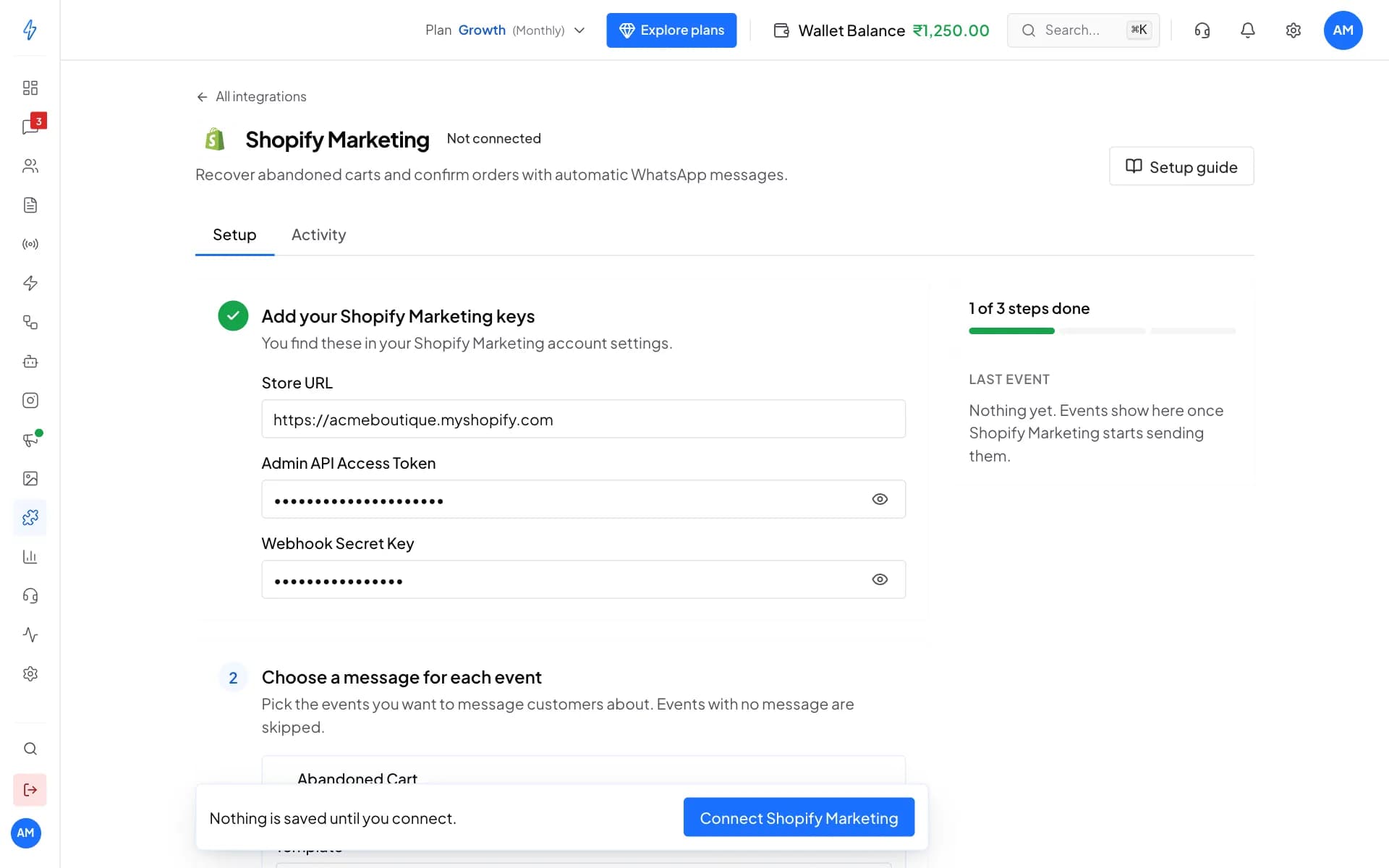
Paste your keys once
- A setup guide for every tool
- Nothing is saved until you connect
Step 2
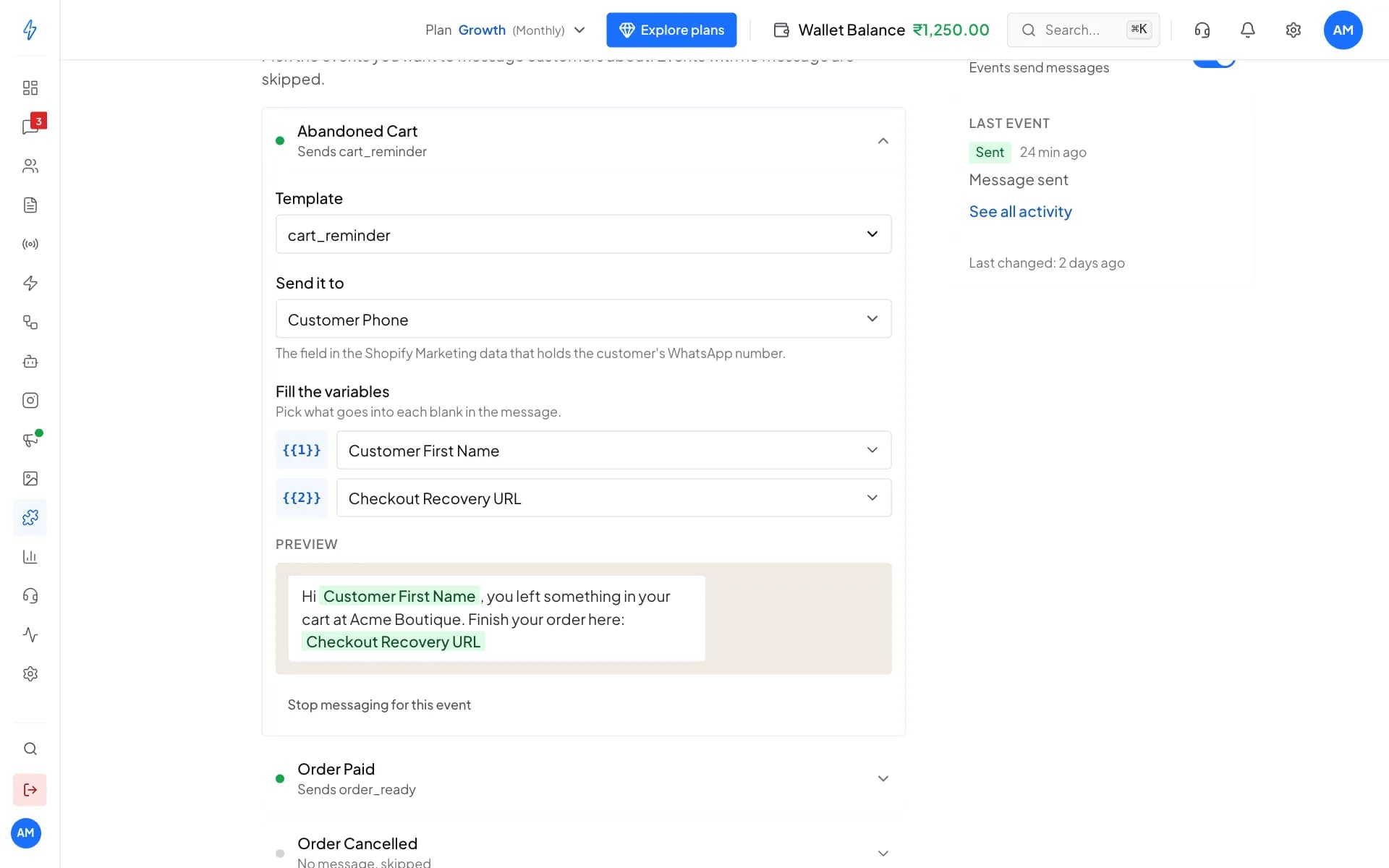
Pick the message for each event
- One template per event
- Events you leave empty are skipped
Step 3
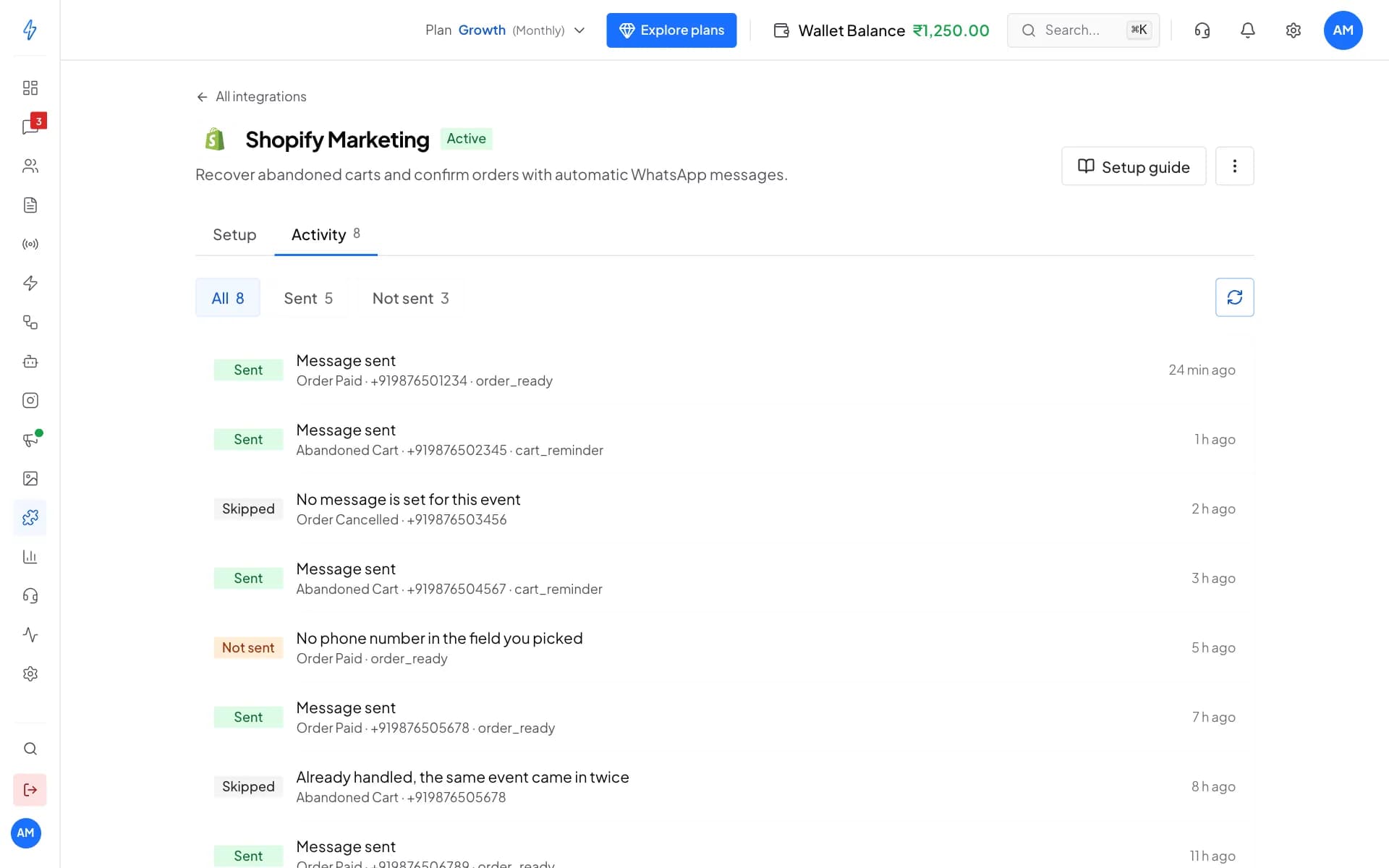
See every event in Activity
- Pause any tool with one switch
- Duplicate events are ignored
Beyond the list
More ways to connect
Website chat widget
Paste one line of code and a WhatsApp chat bubble shows on your site. Every visitor who fills it in is saved as a contact.REST API and apps
Send messages and templates, and add contacts and tags, from your own software with an API key. Or build an app that other businesses connect.Status webhooks
Get delivered, read, reply and button events on your server as they happen, for WhatsApp and RCS.AI assistants and the command line
Use your account from Claude, ChatGPT, Cursor or VS Code, or from the terminal with the splashify CLI.
Integration questions, answered
Want us to check your tools on a call?
No, not for most of them. You paste the keys the tool gives you, pick a WhatsApp template and paste one web address into the tool. Each tool has a step-by-step setup guide. Google Sheets needs a short script, which its guide gives you, or an automation tool such as Zapier, Make or Pabbly Connect.
Growth (from ₹999 a month) includes up to 3 app integrations. Advanced and Enterprise include unlimited app integrations. If a tool is not on your plan, the app asks you to upgrade instead of showing Connect. The pricing page lists everything in each plan.
Each one is a WhatsApp template message, charged like any other: Meta's rate for its category plus your plan's platform fee, from the same wallet as your broadcasts. If the wallet runs out, the message is not sent and Activity tells you why. The next events send once you add money.
Your keys and secrets are stored securely in your account and used only to receive and check your own events. Payment links are made with your own gateway account, so the money goes to you, never to us.
Set the webhook secret too. Razorpay, Stripe, Shopify and WooCommerce sign their events, and we reject any event whose signature does not match, so nobody can send fake events to your URL.
Yes. The generic webhook works with anything that can send a web request, like your website form, booking software or your own app. Send one test event, then build up to 5 workflows that decide who gets which message and tag the contact. Zapier, Make and Pabbly Connect also reach thousands of other apps. Or message us on WhatsApp and we will suggest the quickest way.
Yes. When a checkout is left, the reminder waits 1 hour. If the order is paid in that hour, the reminder is skipped. You pick a separate message for abandoned cart, order paid and order cancelled.
Yes. Switch Active off on the tool's page to pause it; events are ignored until you switch it back on. The Activity tab lists every event with what happened, sent, skipped or not sent, and the reason.
Most teams are live within 1-2 hours through Meta's guided signup. You'll need a Meta Business Account, a phone number not currently registered with WhatsApp, and basic business verification documents. Our team helps you on WhatsApp if you get stuck.
Yes. Export your contacts, connect your WhatsApp Business number through Meta's guided signup, then import your contacts and add your templates again. Our team helps you on WhatsApp while you switch.
Message only people who have agreed to hear from you on WhatsApp; Meta requires it. Opted-out and blocked numbers stay in their own list and never get your broadcasts. Customer data is encrypted at rest and in transit, every action in your account is logged, and data requests under India's DPDP Act go through our data request page.
Want us to check your tools on a call?
Connect your store, payments and CRM. Start free for 14 days.
- 14-day free trial
- No credit card
- Setup help on WhatsApp