
Click to WhatsApp ads
Click to WhatsApp ads that bring sales, not just chats
- 7-day free trial
- No credit card
- Setup help on WhatsApp
- Plans from ₹999/month + GST
acmeboutique
Sponsored
Diwali Sale
30% off kurtas and sarees
- Customer: Replying to an Instagram ad: Diwali sale: 30% off. Hi! I saw your Diwali sale ad. Is the green silk saree still available?
- Acme Boutique: Hi Sneha! Yes, the green silk saree is in the Diwali sale at ₹4,199. Shall I send photos, or keep one aside for you?
Verified Business
Instagram ad
Diwali sale: 30% off
Our Diwali sale is live! 30% off kurtas and sarees.
acmeboutique
Sponsored
Diwali Sale
30% off kurtas and sarees
acmeboutique Our Diwali sale is live! 30% off kurtas and sarees. Tap to chat and we will send you the catalogue.
demostore
- Acme Boutique: Hi! Welcome to Acme Boutique. Our Diwali sale is on: 30% off kurtas and sarees.
- Customer: Replying to an Instagram ad: Diwali sale: 30% off. Hi! I saw your Diwali sale ad. Is the green silk saree still available?
- Acme Boutique: Hi Sneha! Yes, the green silk saree is in the Diwali sale at ₹4,199. Shall I send photos, or keep one aside for you? Buttons: More photos, Reserve one.
Verified Business
Instagram ad
Diwali sale: 30% off
Our Diwali sale is live! 30% off kurtas and sarees.
Splashify Pro is a Meta Business Partner.
2 out of 3businesses in India said ads that click to message increased their return on investment.
70%of businesses in India said these ads increased their return on ad spend.
71%of online adults said they would like to message a business right after clicking its social media ad.
Meta's survey figures, not Splashify Pro results. Source: Meta, facebook.com/business/ads/click-to-message-ads (opens in a new tab)
The ad
What your ad looks like
- Demo adInstagramA
acmeboutique
Sponsored
Diwali Sale
30% off kurtas and sarees
Send WhatsApp messageacmeboutique Our Diwali sale is live! 30% off kurtas and sarees. Tap to chat and we will send you the catalogue.
Ddemostore
SInstagram feed ad
Shows in the feed, between posts. The Send WhatsApp message bar sits right under the picture or video.
Good for: Shops and D2C brands
- Demo ad
 NEET 2027
Crash course
Free demo class this Sunday
Aacmeacademy
Sponsored
Send WhatsApp messageStories ad
Full screen and upright, between Stories. The button sits at the bottom.
Good for: Coaching, events and offers with a date
- Demo adfacebookA
Acme Homes
SponsoredNew 2 and 3 BHK homes in Kharadi, Pune. Ask for the floor plan on WhatsApp.
 Kharadi, Pune
2 and 3 BHK homes
From ₹62 lakh
WhatsApp
Book a free site visit
Send WhatsApp messageLikeCommentShareDDemo Store
Facebook feed ad
Shows in the Facebook feed. The grey bar under the picture carries your headline and the Send WhatsApp message button.
Good for: Real estate, clinics and services
Demo ads, made-up brands. Make any of these, or a video or carousel ad, in Meta Ads Manager. Chats from all of them reach your Splashify Pro inbox with the ad's details on top.
After the tap
From ad tap to sale, in one chat
Diwali Sale
30% off kurtas and sarees
Send WhatsApp messageStep 1: They tap your ad
On Facebook or Instagram, the button says Send WhatsApp message. No page to load, no form to fill.
- Acme Boutique: Hi! Welcome to Acme Boutique. Our Diwali sale is on: 30% off kurtas and sarees.
- Typed and ready to send: Hi! I saw your Diwali sale ad. Is the green silk saree still available?
AAcme BoutiqueVerified Business
Hi! Welcome to Acme Boutique. Our Diwali sale is on: 30% off kurtas and sarees.19:20Hi! I saw your Diwali sale ad. Is the green silk saree still available?Step 2: WhatsApp opens, message ready
Your greeting shows, and their first message is already typed. One tap sends it.
- Acme Boutique: Hi Sneha! Yes, the green silk saree is in the Diwali sale at ₹4,199. Shall I send photos, or keep one aside for you? Buttons: More photos, Reserve one.
Hi Sneha! Yes, the green silk saree is in the Diwali sale at ₹4,199. Shall I send photos, or keep one aside for you?21:22More photosReserve oneStep 3: Your AI agent replies
It reads the ad they tapped and answers the question behind it, day or night. Your bot can ask what they need and tag hot leads for your team.
- Lead sent to MetaPurchase ₹4,199 sent to Meta
Step 4: Meta hears about the sale
When the chat becomes a lead or a sale, Splashify Pro tells Meta through CAPI, so your next ads find more buyers.
What your team sees in the inbox
- An ad mark on every chat that came from an ad
- The ad's picture, headline and a View ad button above the first message
- The ad ID and link on the contact, ready to copy
Conversions API
Meta CAPI, in plain words
Without CAPI
Meta only knows that a chat started. So it looks for more people who like to start chats, including people who ask the price and leave.
With CAPI
Splashify Pro tells Meta which chats became leads and sales. Meta can then show your ads to more people like your buyers.
You see the same leads and purchases for each ad in Splashify Pro, with cost per lead, cost per purchase and return on ad spend.
What travels to Meta
Ad tap
Meta adds a click ID to the first message
WhatsApp chat
Splashify Pro saves the click ID on the chat
Lead or sale
Your rule decides when it counts
Meta
Meta learns which ads bring buyers
For ad chats we send the click ID, your WhatsApp business account ID, the event and, for a purchase, its value and currency. We never send the chat text or the customer's phone number.
You choose when a chat counts
Pick one rule for leads and one for purchases.
AI decides the chat is a real leadRecommended
After at least two customer messages, our AI scores the chat out of 100, in English, Hindi, Hinglish and other Indian languages. Above your bar it counts as a lead; when the customer buys, as a sale, with the amount they state in the chat. Each chat counts once. Charged per chat scored.
A new message comes in
Every chat that starts from an ad counts as a lead. Simple, but Meta then learns from every chat, not only buyers.
The chat gets a tag
Your team adds a tag you pick in the inbox, such as Paid or Hot lead, or your system adds it through our contacts API.
Sent from our API
Your store, billing tool or CRM sends the sale with its real amount. On every plan, with an API key.
Why it pays to tell Meta
24% lower cost per leadfor ads that click to WhatsApp optimised for leads, compared with ads optimised for conversations.
10% lower cost per purchasefor ads optimised for purchases through messaging, compared with ads optimised for conversations.
Lead and purchase goals learn from the results Meta can see. CAPI is how your WhatsApp leads and sales reach Meta.
Source: Meta, "Down-funnel optimizations for ads that click to WhatsApp". 24%: test of 116K campaigns across 43K businesses, 4 to 10 Nov 2024. 10%: week-long global study, H2 2024. whatsappbusiness.com/resources/resource-library/down-funnel-optimizations-whatsapp/ (opens in a new tab)
Key features
Everything after the tap, in one app
Ad chats in your inbox
Know which ad started every chat
- The ad card on top of the chat
- Ad ID and link on the contact
- Your team replies from the same inbox

Replies for each ad
A different first reply for each ad
- Flow trigger: a customer taps your ad
- Your AI agent can tag hot leads and add deals to your sales pipeline
- Send contacts and deals to HubSpot, or to any CRM by webhook
- Customer: Replying to an Instagram ad: NEET 2027 crash course. Hi! I saw your ad. Is the demo class this Sunday free?
- Acme Academy: Yes, the demo class is free! It is this Sunday at 11 am, at our Kothrud centre or online. Which suits you? Buttons: At the centre, Online.
- Customer: Online
- Acme Academy: Done! Your seat is booked for Sunday at 11 am, online. We will send the class link on Saturday evening.
Verified Business
Instagram ad
NEET 2027 crash course
Free demo class this Sunday.
Ad reports and coach
See cost per sale, not just cost per chat
- Numbers synced from Meta
- Past 7 days, past 30 days or this month
- Meta's own recommendations in the app
Spend
₹12,990
Leads
214
Purchases
37
Diwali sale: 30% off
Cost per lead
₹48
Cost per purchase
₹238
Return on ad spend
4.2x
Silk sarees video
Cost per lead
₹72
Cost per purchase
₹462
Return on ad spend
2.1x
Kurta new arrivals
Cost per lead
₹97
Cost per purchase
₹1,315
Return on ad spend
0.6x
Inside the app
See chat ads in the app
Click through the real app, screen by screen. Every screenshot is Splashify Pro with sample data.
Spend, chats started, cost per chat, leads and purchases from your ads in one view.
Click a number to see what it does, or use the arrow keys.
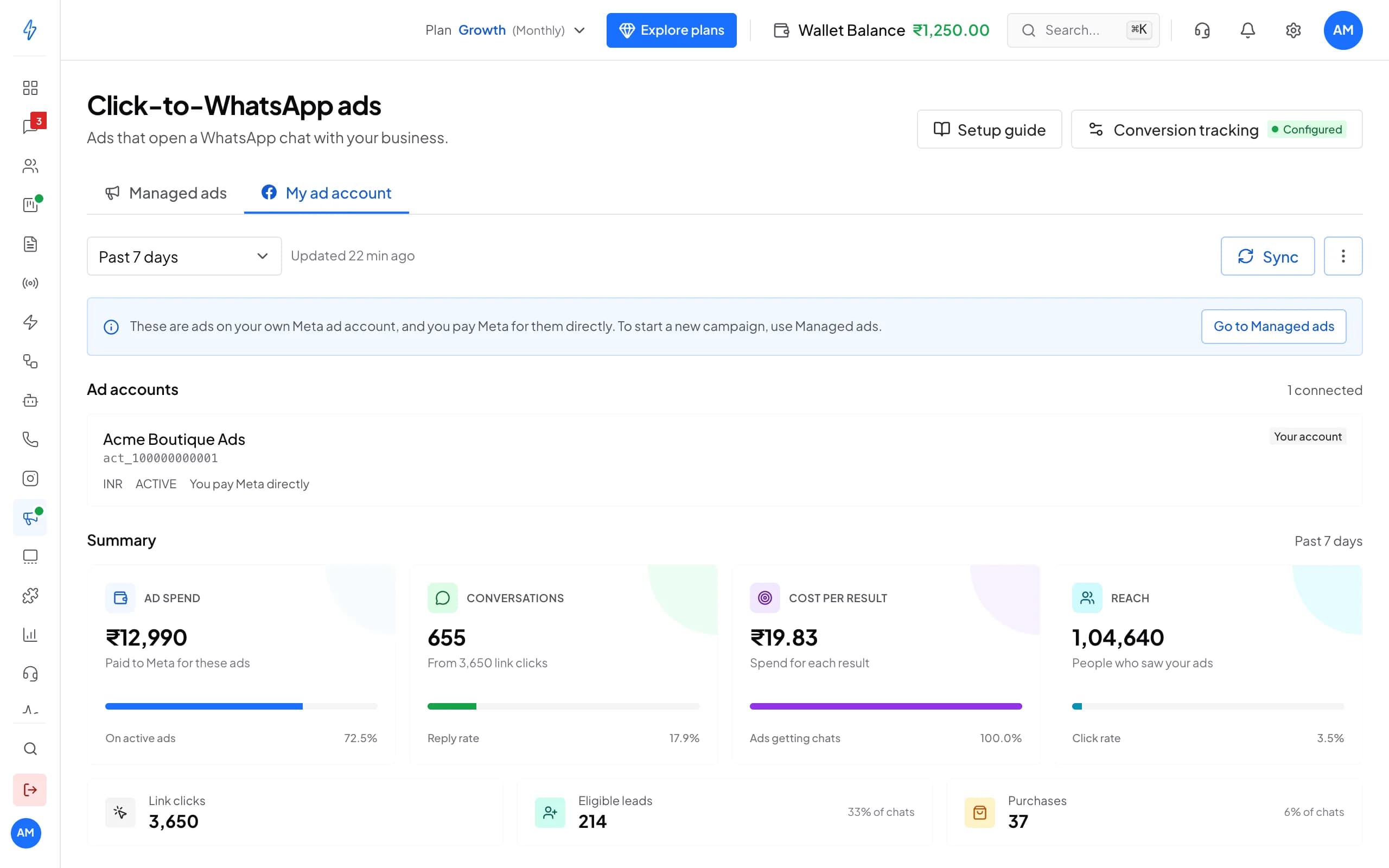
1 of 6
Your ad account
Track the ads on your own Meta ad account.
Try it with your own number
7 days with every feature and no credit card. Our team helps you set up on WhatsApp.
Profit
How chat ads make you profit
Ad A
Example- Cost per chat
- ₹30
- Chats that buy
- 1 in 25
- Cost per sale
- ₹750
Ad B
Example- Cost per chat
- ₹60
- Chats that buy
- 1 in 8
- Cost per sale
- ₹480
Ad B costs twice as much per chat, but each sale costs less. If you judge ads by cost per chat, you pause the wrong one. With CAPI, Meta and your reports both see the sales.
No landing page drop-off
WhatsApp opens with the message typed. There is no page to load and no form to fill.More chats become sales
The AI agent answers at once, and your bot asks the qualifying questions and tags hot leads, so your team calls them first.Sell again later
Tag ad leads, then follow up with a drip campaign or a broadcast. After 24 hours WhatsApp needs an approved template, charged per message.
Try your own numbers
Example, not a promiseChange any number to see your own cost per sale. The starting numbers are an example: ₹1,000 a day for 30 days, ₹40 a chat, 1 in 10 chats buying at ₹1,500, and a 40% margin.
Same spend, if 1 in 8 chats buys: 93 orders, ₹1,39,500 in sales and ₹25,800 profit after ad spend.
Example numbers to show the maths. Your costs depend on your product, offer, audience and budget. Ad spend is paid to Meta; your Splashify Pro plan, message charges and GST are not included.
Ad spend
₹30,000
Chats
750
Orders
75
Sales
₹1,12,500
Return on ad spend
3.75x
Cost per sale
₹400
Profit after ad spend
₹15,000
Ad spend is paid to Meta. Your Splashify Pro plan, message charges and GST are not included.
Compare
Chat ad, website or lead form?
| What you get | Click to WhatsApp ad | Ad to your website | Lead form ad |
|---|---|---|---|
| Nothing to load or type | Yes Message is ready | No Page and form | Yes Meta fills the form |
| A WhatsApp number that works | Yes | Only if typed right | Number from their profile |
| Reply right away, in the same place | Yes | Only with live chat | No You call back |
| Customer can ask before buying | Yes | Only with live chat | No |
| Follow up in the same chat later | Yes Template after 24 hours | No | No |
| Leads and sales reported to Meta | Yes With CAPI, built in | Yes Pixel or CAPI on your site | Leads yes, sales need CRM setup |
Each route has a place. A website suits large catalogues. Lead forms suit simple sign-ups. Chat ads suit products people ask about before they buy: sarees, courses, homes, treatments.
Proof from Meta
Indian businesses in Meta's case studies
Nutryfit
Nutrition programmes, India
12% lower cost per lead when its ads were optimised for leads instead of conversations.
Meta A/B test in Ads Manager, 1 to 18 April 2025. Results the business reported. Yours will differ.
Source: Meta, whatsappbusiness.com/resources/success-stories/nutryfit/ (opens in a new tab)
The Little Farm Co
Homemade pickles, India
46% more customer messages at 32% lower cost, with video ads that click to WhatsApp.
Results the business reported. Yours will differ.
Source: Meta, whatsappbusiness.com/resources/success-stories/the-little-farm-co/ (opens in a new tab)
Quattro Bistro, Lonavala
Restaurant
3X sales on Valentine's Day 2025 compared with Valentine's Day 2024, when it did not use these ads.
Results the business reported. Yours will differ.
Source: Meta, whatsappbusiness.com/resources/success-stories/quattro-bistro-lonavala/ (opens in a new tab)
Your results depend on your product, offer, audience and budget.
Live in four steps
Most of it is clicks, not code.
Step 1: Connect your WhatsApp number
Sign up and connect your number through Meta's guided signup.
Step 2: Connect your Meta ad account
Your spend, chats, leads and purchases sync into Splashify Pro.
Step 3: Turn on conversion tracking
Pick when a chat counts as a lead and a sale. We create the Meta dataset for you.
Step 4: Launch your ad
In Meta Ads Manager, pick Leads, Sales or Engagement, then WhatsApp as the messaging destination.
Frequently asked questions
Still have a question?
It looks like any Facebook or Instagram ad: a picture, a video or a carousel, with your text and a Send WhatsApp message button. It can show in feeds, Stories and Marketplace. A tap opens WhatsApp with your greeting and a first message ready to send, so the customer starts the chat with one tap.
CAPI, Meta's Conversions API, lets a server tell Meta what happened after an ad. When someone taps your ad, Meta adds a click ID to their first WhatsApp message. When that chat becomes a lead or a sale, Splashify Pro sends Meta the click ID and the event. Meta can then report leads and sales for each ad and look for more people like your buyers.
Two: a lead and a purchase. A lead goes as LeadSubmitted, or as QualifiedLead when our AI marks the chat as a real lead. A purchase goes with its value and currency. For ad chats we send the click ID and your WhatsApp business account ID, never the chat text or the customer's phone number. Website leads, from our lead widget or from the API when there was no ad tap, go to the same Meta dataset with the phone number and name hashed, as Meta asks.
You choose, separately for leads and purchases: when our AI decides the chat is a real lead (recommended), when a new message comes in from an ad, when your team adds a tag you pick in the inbox (or your system adds it through our contacts API), or when your store or CRM sends it through our API. For a purchase, set an average order value, or send the real amount through the API. With the AI option, the AI uses the amount the customer states in the chat; if no amount is stated, the sale goes to Meta without a value. Each chat counts once.
No. Connect WhatsApp and your Meta account, open Click-to-WhatsApp ads, then Conversion tracking, and pick your options. We create the Meta dataset on your WhatsApp account for you. You need a developer only if you want your store or CRM to send each sale with its real amount through our API, which every plan and the free trial include.
There are separate costs. Your ad budget is paid to Meta, and you set it. Splashify Pro plans start at ₹999 a month plus GST. Messages you send are charged per message, at the price on the pricing page. Replies within 24 hours of the customer's last message are service messages: the first 1,000 service conversations each month are free, and after that they are charged at the rate on the pricing page. AI features, such as lead scoring and the ads coach, are charged per use from your wallet.
Lead form ads collect a name and number for you to call later. Click to WhatsApp ads start a conversation at once, from a working WhatsApp number, and the customer can ask questions before they buy. If people need to talk before they buy, as with clothes, courses, homes or clinic visits, chat ads fit well. Many businesses test both and compare the cost per sale.
In Meta Ads Manager, pick the Sales or Engagement objective with WhatsApp as the messaging destination, or Leads for leads. Purchase goals learn from the purchases Meta can see, so turn on purchase tracking from the first day. Meta does not publish a fixed minimum; the more sales it sees, the more it has to learn from.
Yes. Chats from ads have an ad mark in the chat list. Inside the chat, the ad's picture, headline and a View ad button sit above the first message, and the contact shows the ad ID it came from. You can also start a different chatbot flow for each ad.
Yes. Run the ad from your own Meta ad account in Ads Manager, then connect that account to Splashify Pro to see spend, chats, leads and purchases for each ad, and to send leads and sales back to Meta.
Still have a question?
Turn your next ad into WhatsApp sales. Start free for 7 days.
- 7-day free trial
- No credit card
- Setup help on WhatsApp