Instagram has quietly become a sales channel that lives in the DMs. With feed engagement falling below 1% in 2026 and over two billion users — 90% of whom follow at least one business — the real conversations (and conversions) now happen in direct messages. The problem: answering every comment and DM by hand doesn't scale past about 50 a day. That's what Instagram automation solves.
This guide explains what Instagram automation is, what Meta actually allows in 2026, how comment-to-DM and Instagram chatbots work, how to set them up, and the best practices that keep your account safe.
What is Instagram automation?
Instagram automation means using software to automatically respond to interactions on your account — DMs, comments and story replies — through Meta's official Instagram API. Instead of manually replying to every "price?" comment, an automation can instantly send each commenter a private DM with your offer, a link or a lead form.
It's broader than just a chatbot. Instagram automation includes comment-to-DM triggers, automated DM replies, welcome messages, story-reply flows, lead capture and follow-ups. An Instagram chatbot is one part of that — the conversational piece that answers questions inside the DM.
Instagram automation vs Instagram chatbot
The terms get used interchangeably, but there's a useful distinction:
- Instagram automation is the whole system — comment triggers, broadcasts, welcome flows, lead qualification and more.
- An Instagram chatbot is the automated conversation that handles replies inside the DM — answering FAQs, qualifying leads, or guiding someone to buy.
Most businesses want both: automation to start the conversation (e.g., comment-to-DM), and a chatbot to carry it.
Why Instagram automation matters in 2026
The numbers make the case:
- DMs convert far better than your bio link — Instagram DM conversion rates are often 3–5× higher than "link in bio" approaches.
- Customers expect speed — around 75% expect a reply within 24 hours, and Instagram rewards fast responders.
- Manual doesn't scale — handling DMs by hand works up to roughly 50 a day; beyond that you either automate or hire.
- Engagement has moved to messaging — with feed engagement down, the businesses winning on Instagram are the ones capturing and replying to every comment and DM, instantly.
In short, Instagram automation has gone from a growth hack to standard infrastructure for any serious Instagram business.
What Instagram automation can do
Common, high-value automations include:
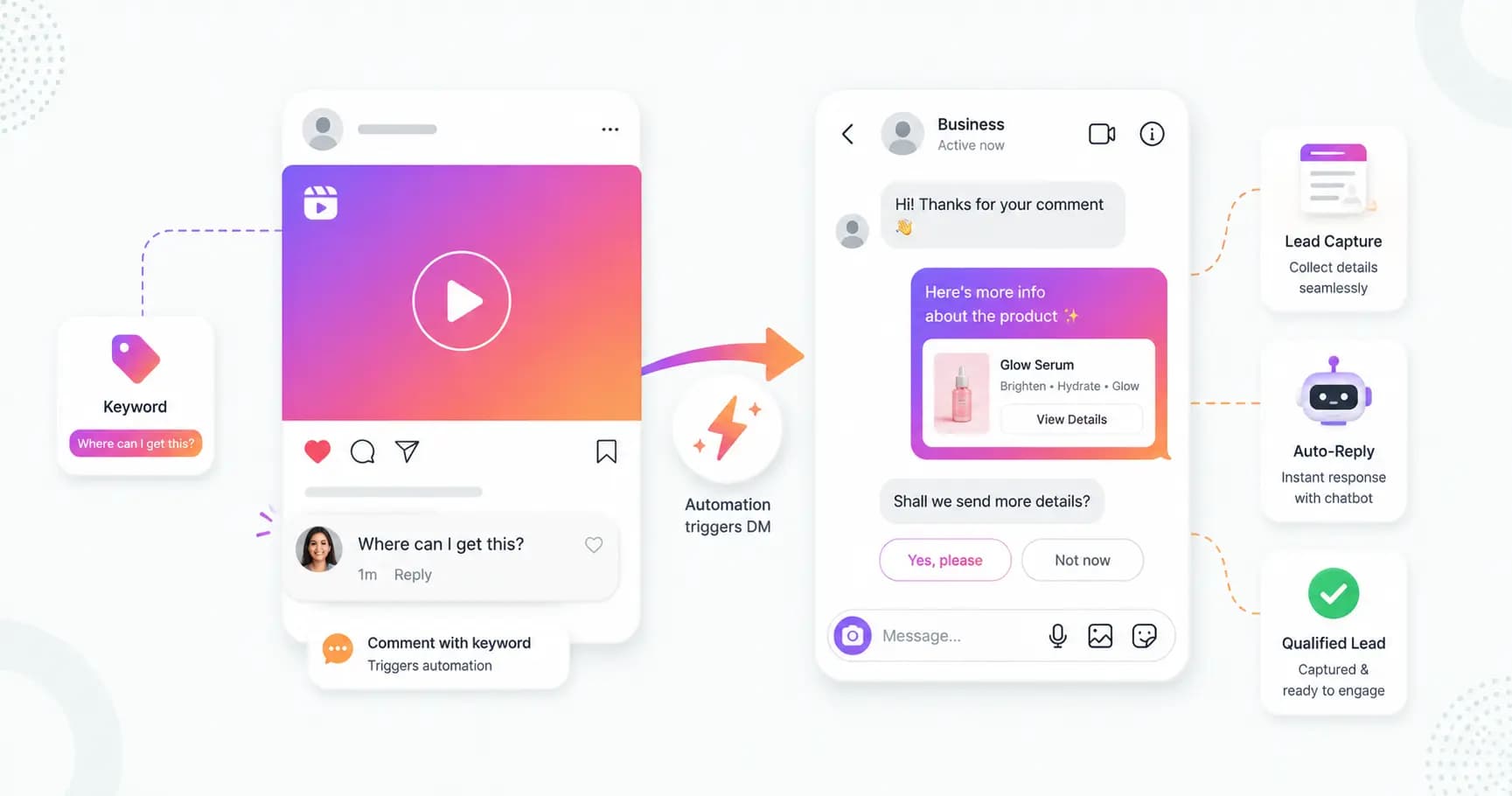
- Comment-to-DM — when someone comments a keyword on your reel or post, they instantly get a DM with your link, offer or lead form.
- Auto-reply to DMs — answer pricing, product and FAQ questions 24/7.
- Story reply and mention responses — react automatically when people reply to or mention your stories.
- Lead capture — collect names, emails or phone numbers inside the DM.
- Booking and sales flows — guide people to book a call or complete a purchase, with quick replies, product carousels and payment links.
- Welcome messages — greet new conversations instantly.
Is Instagram automation allowed? (Meta's 2026 rules)
Yes — Instagram automation is fully compliant when done correctly. It works through Meta's official Instagram Graph API, the same infrastructure Meta built for business messaging. The danger is using unofficial bots or browser extensions, which violate Meta's terms and get accounts banned.
Here are the rules that keep you safe in 2026:
- Use the official API only. Connect through a Meta-approved partner — never scrapers, Chrome extensions, or tools that ask for your password.
- Only respond to user-initiated interactions. Comment-to-DM, story replies and keyword DMs are all triggered by the user acting first. You cannot send cold DMs to people who haven't engaged.
- Respect the 24-hour messaging window. When someone messages you, you have 24 hours to reply freely. After that, you can only send approved message templates until they reply again (which resets the window). Meta now applies a WhatsApp-style framework to Instagram business messaging.
- Stay within rate limits. Keep automated DMs to a reasonable volume (roughly under 200 per hour per account) to avoid being flagged.
- Disclose automation. Many regions require telling people they're talking to an AI — a simple "Hi, I'm the assistant for [Business]" builds trust and keeps you compliant.
- Honor opt-outs immediately. If someone says "stop," your automation must stop messaging them.
Note: Meta tightened enforcement in early 2026, so even on an official API tool, following these rules matters. A good platform enforces the messaging window and limits for you automatically.
The Instagram chatbot API: how it works
If you've searched for the "Instagram chatbot API," here's what's behind it. Instagram chatbots run on the Instagram Graph API (Messaging API), which Meta provides specifically for business messaging. A few essentials:
- You need an Instagram Business or Creator account connected to a Facebook Page. Personal accounts don't have API access. Switching to a professional account is free and takes about two minutes.
- Connection is via Meta's official login (OAuth) — you authorise a platform to send and receive messages on your behalf; your password is never shared, and you can revoke access anytime.
- Webhooks deliver events (a new comment, DM or story reply) to the platform, which then sends your automated response — usually within seconds.
- No developer needed for most uses. No-code platforms give you a visual builder; developers can use the REST API directly for custom integrations.
The Messaging API in 2026 supports rich interactions too — quick replies, product carousels and payment links inside DMs.
Comment-to-DM: the highest-ROI Instagram automation
If you do one Instagram automation, make it comment-to-DM. It turns the engagement on your reels into direct conversations:
- You post a reel with a call to action: "Comment PRICE and I'll DM you the details."
- Followers comment the keyword.
- The automation instantly DMs each commenter your link, offer or lead form — privately.
- Optionally, it also posts a public reply to keep the comment section active.
Because the user comments first, it's fully user-initiated and compliant — and it converts attention into leads at scale. Splashify Pro's Instagram automation is built around exactly this.
How to set up Instagram DM automation
Setup takes about 10 minutes to an hour:
- Switch to an Instagram Business or Creator account and connect it to a Facebook Page (free, in Instagram settings).
- Choose a Meta-approved automation platform (like Splashify Pro).
- Connect your account via Meta's official login.
- Create a trigger — e.g., a comment keyword on a specific reel, or a story-reply or DM keyword.
- Write the automated DM (and optional public reply), and add any media or a lead form.
- Enable lead capture / CRM tagging so every contact is saved.
- Go live and monitor the activity log to see what's converting.
Best practices for Instagram automation
- Trigger on intent. Use keywords that signal interest ("PRICE," "GUIDE," "LINK") so your DMs reach genuinely interested people.
- Reply fast and add value — lead with the thing they asked for, not a sales pitch.
- Capture the lead early — ask for an email or phone number once they've engaged.
- Bridge to WhatsApp — Instagram is great for capture; move serious conversations to WhatsApp for richer follow-up and broadcasts. (A unified inbox makes this seamless.)
- Disclose AI and honor opt-outs — both keep you compliant and build trust.
- Don't over-automate — keep it helpful, not spammy, and let a human take over complex conversations.
How Splashify Pro's Instagram automation works
Most WhatsApp platforms ignore Instagram entirely — Splashify Pro brings both together. Its Instagram automation includes:
- Comment-to-DM out of the box — set keyword triggers per reel or post, no Make/Zapier middleware needed.
- Multi-keyword matching — trigger on any of several keywords (most tools allow only one per rule).
- Public + private replies — auto-DM the commenter and optionally post a public comment reply.
- Media attachments — send images, video or audio in the DM (great for catalogues and demos).
- A unified Instagram + WhatsApp + RCS inbox — your team handles every channel in one place, no app switching.
- Built-in Meta compliance — the platform enforces the messaging window automatically.
- No per-message cost for Instagram — Instagram messaging is currently free from Meta, so you only pay your Splashify Pro subscription.
It's a Meta and Instagram Business Partner, no-code for most workflows, and live in 1–2 hours.
Frequently asked questions
Is Instagram automation against the rules?
No — automation that uses Meta's official Instagram Graph API is fully compliant. Accounts get banned for using unofficial bots, browser extensions, scrapers, or sending cold DMs to people who haven't engaged. Use a Meta-approved platform and respond only to user-initiated interactions.
Do I need a Business or Creator account for Instagram automation?
Yes. The Instagram Messaging API is only available to Business or Creator accounts connected to a Facebook Page. Personal accounts can't be automated. Switching to a professional account is free and takes about two minutes.
What's the difference between Instagram automation and an Instagram chatbot?
Instagram automation is the whole system — comment triggers, broadcasts, welcome flows and lead capture. An Instagram chatbot is the automated conversation inside the DM that answers questions and qualifies leads. A chatbot is one type of Instagram automation.
Can I send automated DMs to people who haven't messaged me?
No. Instagram's API only lets you respond to user-initiated interactions — comments, story replies, or DMs people send you. Cold outreach DMs via automation aren't allowed and will get your account flagged.
What is the 24-hour messaging window on Instagram?
When a customer messages you, you can reply freely for 24 hours. After that, you can only send approved message templates until the customer messages again, which resets the window. Good automation platforms handle this for you.
How much does Instagram automation cost?
Instagram messaging itself is currently free from Meta — there's no per-message charge like WhatsApp. You only pay your automation platform's subscription (Splashify Pro starts at ₹899/month).
Will Instagram automation get my account banned?
Not if you use an official, Meta-approved platform and follow the rules — respond only to user-initiated triggers, stay within rate limits, disclose AI, and honor opt-outs. Bans come from unofficial tools and spammy cold DMs.
Can I manage Instagram and WhatsApp together?
Yes — with a unified inbox like Splashify Pro's, Instagram DMs and WhatsApp chats land in the same place, so your team replies to both channels without switching apps.
The bottom line
In 2026, Instagram automation is how businesses turn comments and DMs into real leads — instantly, around the clock, and within Meta's rules. Start with a comment-to-DM flow, use the official API, respect the messaging window, and bridge serious conversations to WhatsApp. Done right, it captures revenue you're currently leaving in your comment section.
Automate your Instagram DMs with Splashify Pro → — comment-to-DM, a unified Instagram + WhatsApp inbox, and Meta-compliant by design. Free for 14 days, no credit card. Or explore Instagram automation.
- #comment to dm
- #instagram automation
- #instagram chatbot
- #instagram chatbot api
- #instagram dm automation
- #instagram lead generation