
WhatsApp API for developers
Build WhatsApp into your product
- Free developer account
- No Splashify Pro account needed to sign up
- Customers pay for their own messages
Choose your path
Four ways to build with Splashify Pro
For your own business
Use the API key from Settings > Developer in your Splashify Pro account. Send WhatsApp messages and email from your own code, and get webhooks for replies and delivery.For SaaS apps many businesses use
Add a Connect Splashify Pro button to your CRM, booking tool or shop builder. Each customer signs in, clicks Allow, and your server gets a token for only what they allowed. Agencies can build once for many clients.With AI assistants
Connect Claude, ChatGPT, Cursor and other AI assistants to a Splashify Pro WhatsApp account with one link. No code and no developer account needed. Needs a plan with API access.With ready integrations
Connect Shopify, WooCommerce, HubSpot, Google Sheets, Zapier and more to WhatsApp. Most tools need no code.
What you can build
Put WhatsApp inside your SaaS product
CRM: a message when a deal moves
Send an approved WhatsApp template from the customer's own number when a deal changes stage.Booking tool: reminders
Send booking reminders and changes on WhatsApp, and check that each one was delivered.Shop builder: order updates
Send order and delivery updates from the store's own WhatsApp number.Lead forms: new contacts
Add each new lead as a contact with tags and notes, ready for the team to reply.Reports: template results
Show sent, delivered and read counts for each template inside your dashboard.Sales tools: pick a template
Show the customer's approved WhatsApp templates in your app, so their team can pick one and send it.
How Connect with Splashify Pro works
From sign-up to the first message in four steps
Steps 1 and 2
Create a free developer account and register your app
- Up to 10 apps per developer account
- Up to 10 redirect URLs
- Two secrets at a time, so you can change them with no downtime
- Turn on two-step sign-in with an authenticator app
Steps 3 and 4
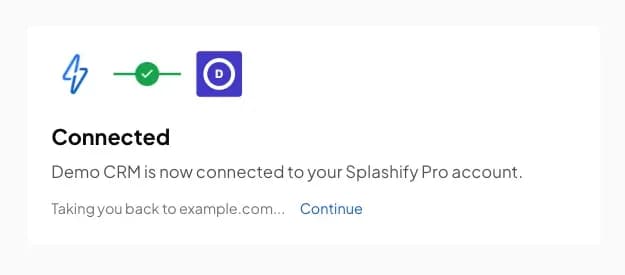
Your customer clicks Allow. You send for them.
- Only the account owner can allow an app
- New apps show as from an unverified developer until review
- Access tokens last 1 hour. Refresh before the hour is up.
- They can remove your app at any time in Settings, Connected apps
Quick start
The whole flow in four calls
# 2. Swap the code for tokens on your server, within 60 seconds
curl -X POST https://api.splashifypro.com/api/v1/oauth/token \
  -u "YOUR_CLIENT_ID:YOUR_CLIENT_SECRET" \
  -d grant_type=authorization_code \
  -d code=CODE_FROM_REDIRECT \
  -d redirect_uri=https://yourapp.example/splashify/callback \
-d code_verifier=VERIFIER# 3. Send a template from your customer's number
curl -X POST https://api.splashifypro.com/api/v1/public/message \
-H "Authorization: Bearer ACCESS_TOKEN" \
-H "Content-Type: application/json" \
-d '{
"countryCode": "+1",
"phoneNumber": "5550101234",
"type": "Template",
"template": {
"name": "order_update",
"languageCode": "en",
"bodyValues": ["Alice", "#1042"]
}
}'# 4. Refresh before the hour is up. Save the new refresh token every time.
curl -X POST https://api.splashifypro.com/api/v1/oauth/token \
-u "YOUR_CLIENT_ID:YOUR_CLIENT_SECRET" \
-d grant_type=refresh_token \
-d refresh_token=REFRESH_TOKENQuick start
Every step, with a Node.js sample.Tokens
Lifetimes, refresh and errors.API reference
The full reference for every endpoint.
APIs and webhooks
One API for WhatsApp and email
| What | With your API key | From a connected app |
|---|---|---|
| Send WhatsApp messages and templates | Yes | Yes |
| Check message delivery | Yes, or by webhook | Its own messages |
| Add contacts, tags and notes | Yes | Yes |
| Read contacts | Yes | Verified apps only |
| Read templates and results | Yes | Yes |
| Send email | From your account | No |
| Webhooks for events | Yes | No |
| Meta Conversions API events | Yes | No |
- Connected apps check delivery by asking. They do not get webhooks.
- Your plan sets the per-minute API limit. A connected app shares the limit of the customer's plan, and also has its own limits.
Send with your API key
curl -X POST https://api.splashifypro.com/api/v1/public/message \
  -H "Authorization: Basic YOUR_API_KEY" \
  -H "Content-Type: application/json" \
  -d '{
    "countryCode": "+1",
    "phoneNumber": "5550101234",
    "type": "Template",
    "template": {
      "name": "order_update",
      "languageCode": "en",
      "bodyValues": ["Alice", "#1042"]
    }
}'curl -X POST https://api.splashifypro.com/api/v1/public/email/send \
-H "Authorization: Basic YOUR_API_KEY" \
-H "Content-Type: application/json" \
-d '{
"to": "[email protected]",
"subject": "Your order #1234 is confirmed",
"html": "<h1>Order confirmed</h1><p>Thank you, Alice. Your order ships in 2 business days.</p>",
"from_name": "Demo Store",
"from_email": "[email protected]"
}'Webhooks
Get incoming messages, delivery, read and failed updates, button clicks, template status changes, opt-outs and wallet alerts on your server. Each event is signed with HMAC-SHA256 in the X-Splashify-Signature header.
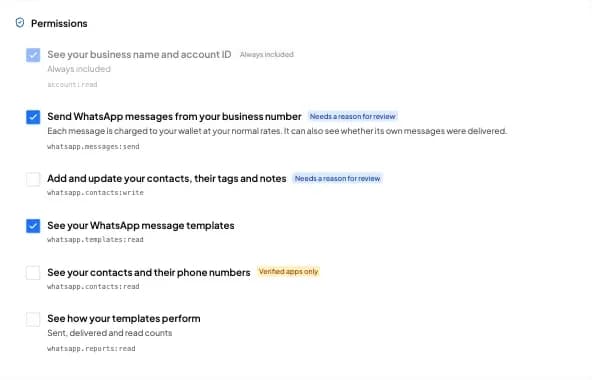
Permissions
Your customers see every permission in plain words
Account, messages and templates
- Always included
See your business name and account ID
account:read
- Needs a reason
Send WhatsApp messages from your business number. Each message is charged to your wallet at your normal rates.
whatsapp.messages:send
- Any app
See your WhatsApp message templates
whatsapp.templates:read
- Any app
See how your templates perform
whatsapp.reports:read
Contacts
- Needs a reason
Add and update your contacts, their tags and notes
whatsapp.contacts:write
- Verified apps only
See your contacts and their phone numbers
whatsapp.contacts:read
Any app: any app may ask. Needs a reason: say why when you apply for review. Verified apps only: works after your app is verified.
App review
Live at once. Verified after review.
| New app | Verified app | |
|---|---|---|
| Works for customers | At once | Yes |
| Connected accounts | Up to 25 | No limit |
| Sends a day, per account | 500 | No limit |
| Read contacts | No | Yes |
| API calls a minute, per app | 1,200 | 12,000 |
| Shown to customers | Unverified developer | Your legal name and a badge |
What review needs
- A square logo, at least 256 by 256 pixels
- Links to your homepage, privacy policy and terms
- A support email
- A reason for each permission that needs one
- Your company details: legal name, website and country
If you change your app's name, logo, homepage, privacy or terms link or support email, add a permission, or add a redirect URL on a new host, the badge comes off until we check the app again. Your limits stay the same meanwhile. Customers can report an app, and we read every report.
AI assistants
Your customers can also ask their AI assistant
Connector link
https://mcp.splashifypro.com/mcpFor coding
Add the same link to Claude Code, Cursor or VS Code. Then ask about your own account while you build: templates, delivery and wallet.Prefer the terminal?
The splashify CLI runs your own account from the command line with a personal access token.
Pricing
Free for developers
Free developer account
Sign up, register up to 10 apps and connect customers at no cost.Customers pay for their messages
Each message your app sends is charged to the connected customer's wallet or account at their normal rates. Nothing is charged to you.What your customers need
A Splashify Pro plan with API access and a connected WhatsApp number.
Testing? Connect a Splashify Pro account you own. It counts toward your app's limits, and its messages are charged to it.
Questions developers ask
The docs cover every step, with code.
No. The developer account is free and separate from Splashify Pro business accounts. To test your app, connect a Splashify Pro account you own. Its plan must include API access.
Nothing. Connect with Splashify Pro is free for developers. Each message your app sends is charged to the connected customer's own wallet or account at their normal rates.
Account owners of app.splashifypro.com accounts whose plan includes API access and who have a WhatsApp number connected. Team members cannot connect apps.
Yes. A new app is live at once for up to 25 connected accounts and 500 sends a day per account. Customers see it as from an unverified developer. Apply for review to remove these limits.
Open your app's Permissions tab and complete the review list: a logo, your homepage, privacy policy and terms links, a support email, a reason for each permission that needs one, and your company details. Then submit it for review. We check the app and your company by hand, and we email you when the review is done.
No. Test with a Splashify Pro account you own, through the normal consent screen. It counts toward your app's limits, and the messages it sends are charged to that account.
Ask the message status endpoint with the message ID. Connected apps do not get webhooks. If you build only for your own account, your API key can use webhooks instead.
Your app loses access at once. Your next API call gets a 401 error and your next refresh fails. Ask the customer to connect again if they want to.
Yes. It is the OAuth 2.0 authorization code flow with PKCE. Access tokens last 1 hour. Each refresh gives you a new refresh token, and the old one stops working. A refresh token that is not used for 90 days expires.
Your server must hold the client secret and make the token calls. Never put the secret in a browser or a mobile app. Your mobile or web app can send users to the consent page and talk to your server.
Yes. Each connected account can make 600 API calls a minute, and each app 1,200 a minute (12,000 when verified). Calls to the WhatsApp API also share the customer's plan limit with their own API key. If your verified app needs more, write to [email protected].
The docs cover every step, with code.
Build your first Splashify Pro app today.
- Free developer account
- Live at once for up to 25 accounts
- Verified badge after review